
Making the Laayo app open fast, even the very first time
We timed a brand new install from tap to home screen and found a chain of small waits. Here is how we cut them, from GPS and duplicate calls to images and one bundled home request.

Speed in a delivery app is measured in two places. The first is obvious: how fast your food arrives. The second is how fast the app gets out of your way when you are hungry. If the home screen takes long enough that you start wondering whether the app is broken, you have already had a bad experience before you have seen a single restaurant.
We set ourselves a simple goal: the app should feel open in under a second for someone who uses it every day, and a new user who has just installed it should never stare at a spinner long enough to give up. This post walks through what we measured and what we changed.
Following one new user#
We started with the hardest case: a phone that has never had Laayo installed. We went through every step between tapping the icon and seeing restaurants, and timed each one.
What we found was not one slow thing. It was a chain of small waits, each reasonable on its own, that added up.
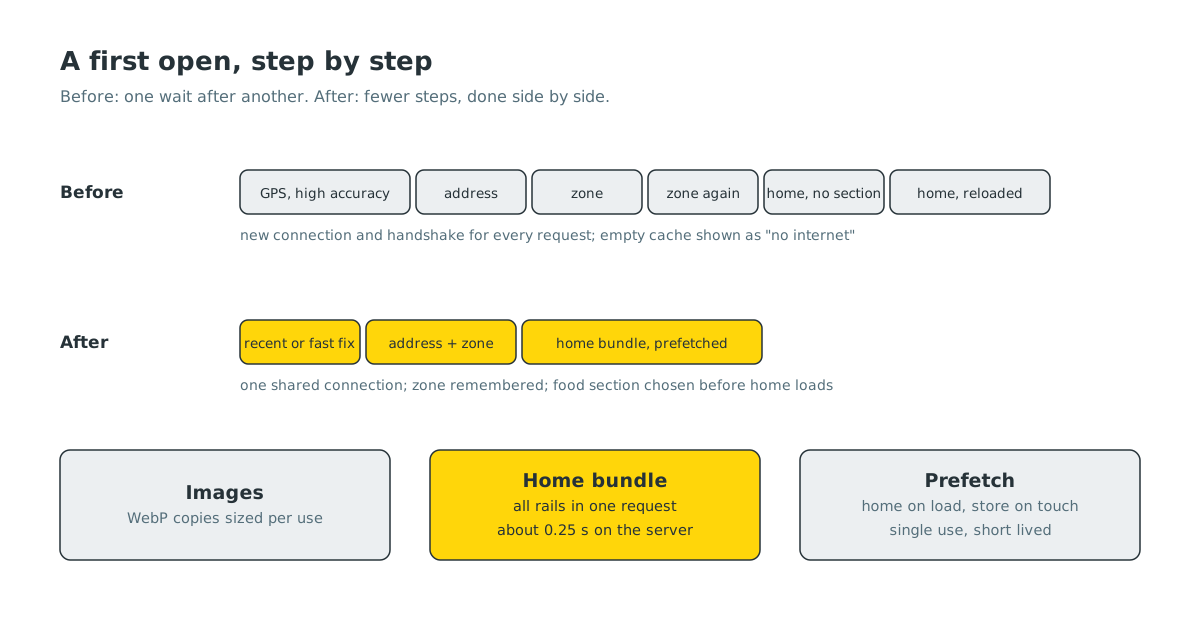
- GPS asked for perfection. The app asked for a high accuracy location with a 15 second limit and ignored any recent location the phone already knew. Indoors, that often meant waiting the full 15 seconds.
- The same question, three times. After getting a location, the app asked the server which delivery zone it was in. Then it asked again. Then a third time, from a different screen. Each answer was the same.
- Loading before deciding. The app picked the food section only after the home screen appeared, so the first loading pass ran without knowing what to load, and then threw the result away and loaded again.
- A new connection for every call. Each API request opened a fresh connection to the server, with its own security handshake. The home screen makes dozens of requests in its first few seconds.
- A false alarm. On a brand new install there is no saved app configuration yet. The app treated that empty cache as “no internet” and briefly flashed an error screen, even on a perfect connection.
Fixing the chain#
Each fix was small:
- A fast first fix. If the phone has a location from the last two minutes that is close enough, we use it straight away. If not, we ask for a medium accuracy fix first and only then for high accuracy. The worst case stays the same, but the usual case is much faster.
- Ask once, remember briefly. Zone lookups are now remembered for a short time per location, and if a lookup is already in flight, everyone waits for that one instead of starting their own. Finding the address and the zone now happen in parallel.
- Decide first, then load. The app chooses the food section before it navigates home, so the first load is the right one.
- Reuse connections. All requests now share one HTTP client that keeps connections open, so the handshake happens once instead of on every call.
- No more false alarm. An empty configuration cache on first launch is no longer treated as a network error.
We also looked at the human steps. A new user used to be sent to a login screen before seeing anything. Now they land on the home screen as a guest and are asked to sign in only when they need to, such as when placing an order. The notification permission prompt moved from the very first frame to a moment where it makes sense.
Images were the real weight#
When we measured what the home screen downloads, the API responses were not the biggest cost. Images were. Restaurant logos and dish photos were often uploaded as large PNG files, some of them several megabytes, and the app downloaded them at full size to show them as small cards.
Rather than ask every partner to re-upload their photos, we fixed it on the server. A background job finds every store and dish image, creates a WebP copy resized for how that kind of image is actually shown, and keeps it next to the original. The web server then quietly serves the WebP copy to apps that ask for the original, whenever a copy exists. If a WebP copy would not be meaningfully smaller, we keep the original. New uploads get their copies within minutes.
Nothing changed in the apps for this to work, and nothing broke for older app versions. They just started receiving smaller files.
One request for the home screen#
The home screen shows several rails at once: popular restaurants, newly added ones, recommendations, offers and more. Each rail was its own request, and the app fired them one after another.
Our Go service now offers a single home bundle request that builds all of those rails in one go, running the individual parts side by side inside the server. Each part is exactly what the separate request would have returned, so the app can use the bundle without any change in what it shows. In our measurements the whole bundle comes back in roughly a quarter of a second, against more than a second for the rails one by one.
Getting there before you tap#
The last trick is to do work before it is needed. The app now starts fetching the home bundle as soon as the home screen begins to load, and it starts fetching a restaurant’s page when a card is about to be tapped, for example when your finger touches it. When the real request is made a moment later, the answer is often already waiting.
These prefetched answers are carefully scoped. Each one is tied to the exact request, your location, your language and whether you are signed in, it can be used only once, and it expires quickly. If anything does not match, the app simply makes the normal request. On Low Data or Data Saver mode, store prefetching is switched off so we never spend data you did not ask us to spend.
The app side of these changes is rolling out with the new customer app. The image copies and the home bundle are already live on the server.
What’s next#
Next we are trimming the data itself. Many API responses include fields the app never reads, and a store object can be much larger than what the screen needs. Smaller responses mean less to download on slow networks and less work for older phones, which matter a lot in the towns we serve.


