
Paying with a QR, without leaving the app
E-Payment used to bounce you out to a web page and back. Now the QR opens inside Laayo, the app sees when you scan, and your cart waits for you if anything goes wrong.

Most people in Birtamod and Damak already pay for things by scanning a QR. The tea shop has one taped to the counter, the pharmacy has one, the bus counter has one. So when you choose E-Payment on Laayo, you already know what you want to do: open your bank app, scan, done.
For a long time our checkout made that harder than it needed to be. Choosing E-Payment opened a web page inside the app, which loaded a payment page, which showed a QR. If you were on the same phone you were paying from, you had to screenshot that QR, switch to your bank app, find the screenshot, and hope the web page was still waiting when you came back. Sometimes it was not. Sometimes the page reloaded and showed a fresh QR. And sometimes people paid, came back, and saw nothing, which is the worst feeling in online payments.
This post is about how we rebuilt that moment.
The QR now lives inside Laayo#
When you place an order and pick E-Payment, Laayo now shows its own payment screen. There is no web page in between. The screen shows the amount, the QR and a short countdown, and it has two buttons that matter on a single phone: Download QR, which saves the code to your photos so your bank app can read it from the gallery, and a way to try again if the code runs out.
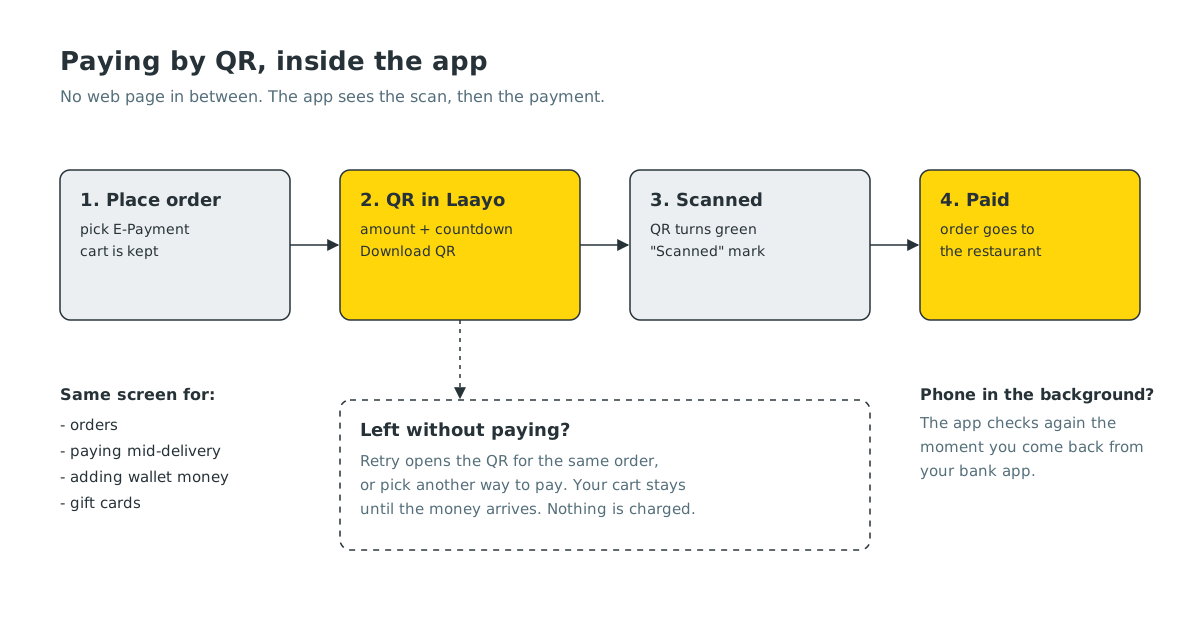
While the screen is open, the app keeps checking whether the payment has arrived. When it does, you go straight to your order. You do not need to press anything, and you do not need to come back to a browser tab.
We used the same screen everywhere money moves by QR in the app:
- placing an order,
- paying for an order that is already on its way,
- adding money to your Laayo Wallet,
- buying a gift card.
One screen means one set of habits. If you have paid for an order this way, you already know how to top up your wallet.
“Scanned” before “Paid”#
There is a gap of a few seconds between scanning a QR and your bank confirming the payment. On the old page that gap was silent, so people scanned again, or closed the screen to check their bank app.
Now the app shows the moment you scan. The QR turns green and a Scanned mark appears over it. That is the whole message. We tried adding a line of text asking people to finish in their bank app, and took it out again, because the green code already says “we saw you, keep going”.
Getting this to feel instant took some work. Phones pause apps that are in the background, so when you switch to your bank app and come back, Laayo checks again the moment it returns to the front instead of waiting for its next turn.
Your cart waits for you#
Here is a detail that most people never notice until it goes wrong. On Laayo the order is created first and paid for second. In the old flow, placing the order also emptied your cart. So if the payment failed or you backed out of the QR, you had a pending order you could not pay and an empty cart you could not reorder from.
Now the cart stays exactly as it was until the payment is confirmed. If you leave the QR screen, the app asks if you are sure, then takes you back to your cart with a small sheet: Retry opens the QR for the same order, or you can pick another way to pay. Only when the money arrives does the cart clear itself.
Note: if you leave without paying, nothing is charged. The unpaid order simply expires on its own after a while.
Scan & Pay at the counter#
Some of our partner restaurants and shops have a Laayo QR at the counter. You can scan it from the app, type the amount on your bill and pay with your Laayo Wallet, often with a partner discount shown right on the store card before you pay.
In the next update, Scan & Pay gets its own page instead of jumping straight into the camera. You will see your Laayo Money balance, any bill a cashier has sent you that is waiting for payment, what you have saved on past bills, and the places you paid at recently. Tap the scanner tile and it grows into the camera. Point it at the counter QR and the corners close onto the code, the store card appears, and you land on the amount page.
When your balance is a little short#
Another small moment that used to cost people: you are at the counter or in the cart, your wallet has रु 70, the bill is रु 107. Before, the app told you the balance was not enough and left you to find the Add Money screen on your own.
In the next update the bar at the bottom says how much you are short, in orange, and the button becomes Add रु 37 & pay. Tapping it opens a small sheet with the exact shortfall already filled in (you can add more), and the QR appears right inside that same sheet. Once the money lands, the balance counts up, the button turns into Pay bill, and the payment starts by itself. If you change your mind halfway, the money you added stays in your Laayo Money for next time.
What we chose not to do#
- We did not add a “confirm in your bank app” banner. The green QR and the Scanned mark do that job with less reading.
- We did not keep a live connection open from your phone to the payment network. If the app holds that line and you switch to your bank app, the connection drops and the QR can be cancelled under you. Our server listens instead, and your phone only asks the server.
- We did not force a minimum top-up. When you are short, the sheet starts at exactly what you need.
What’s next#
Payments are the part of an order where trust is easiest to lose and slowest to win back. Our rule is simple: you should always know whether your money moved, and you should never lose your cart because a payment did not go through. The Scan & Pay page and the low balance flow are rolling out in the next app update.


