
Hey Siri, reorder from Laayo
The next iPhone update adds Laayo to Siri and the Shortcuts app. You can reorder a favourite meal, check where your order is and jump straight to a restaurant by voice. Payment stays in the app, on purpose.

Some of the most common things people do in Laayo are also the most repetitive. Order the same thing from the same place on a weeknight. Check where the rider is. Open a favourite restaurant. Each of these is a few taps, but they are taps you make with greasy hands, a child on your lap, or your phone propped up in the kitchen.
With the next iPhone update, Laayo works with Siri and the Shortcuts app. This post explains what you can do, what we deliberately left out, and how we built it so that saying something to Siri behaves exactly like tapping the same thing in the app.
What you can ask for#
The first version covers these actions:
- Reorder a past order. Siri reads back which order it is about to repeat and asks you to confirm.
- Track your current order. Siri answers right there, with the same status line you see at the top of the tracking screen.
- Order from a restaurant, which opens that restaurant’s menu.
- Search Laayo for a dish or a restaurant.
- Open your cart.
- Open your Laayo Wallet.
These show up in the Shortcuts app as Laayo actions too, so you can build your own routine. For example, a “Dinner” shortcut that opens your usual place, or a home screen button that tells you where your order is without opening anything.
Why payment stays in the app#
The obvious next step would be “Hey Siri, order my usual and pay”. We decided not to do that, at least for now.
Paying for food involves choices you should see: the address, the delivery fee right now, whether a dish is out of stock, which payment method, a tip for the rider. E-Payment also needs you to scan or confirm a QR in another app. A voice conversation is a poor place to check all of that, and a wrong order is worse than a slow one.
So for a reorder, Siri does the part that voice is good at. It finds the order you mean, reads it back and asks you to confirm. Then the app opens with your cart already filled, and you place the order with the normal checkout. You still save most of the taps, and nothing is charged without you looking at the bill.
Building it on what already works#
iOS lets an app describe its actions through a system framework called App Intents. Each action is a small piece of Swift that declares what it needs (an order, a restaurant, a search phrase), how Siri should phrase the question, and what to do when it runs.
The important design rule was: Siri should never have its own version of a feature. If voice and touch take different code paths, sooner or later they drift. Siri reorders something the app would not, or reports a status the tracking screen does not show.
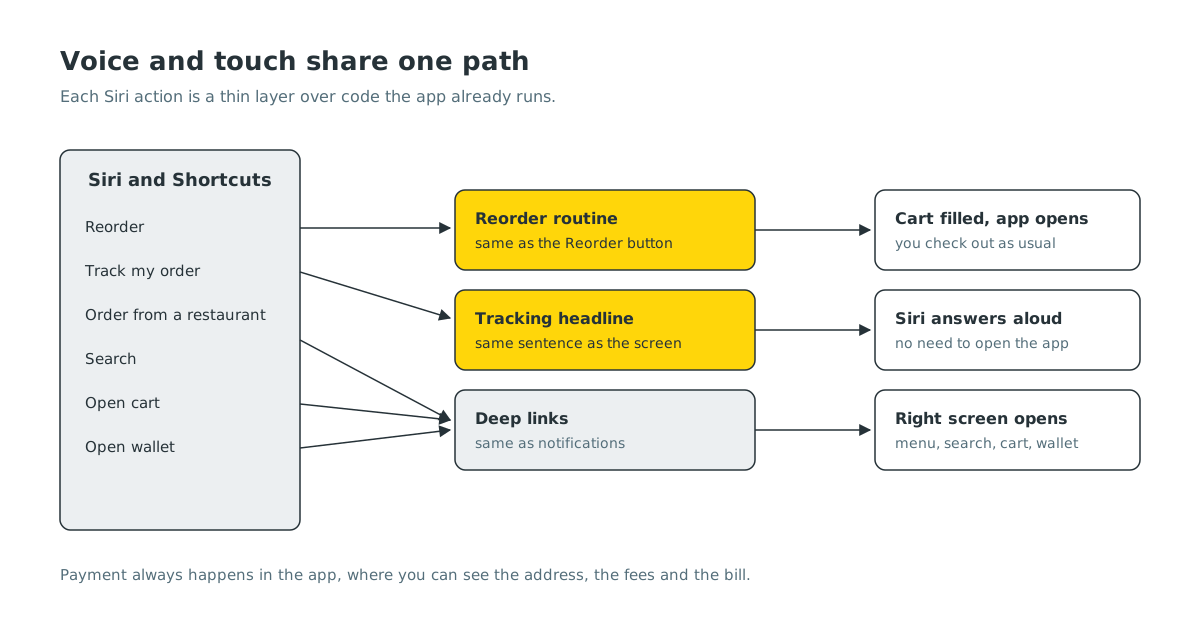
So every intent is a thin layer over code the app already runs:
- Reorder calls the same reorder routine as the “Reorder” button on your order history. It fills the cart the same way the button does, and if part of the old order can no longer be repeated, you get exactly the same handling as when you tap the button.
- Track reads the same tracking data and produces its sentence with the same function the tracking screen uses for its headline. Siri and the screen always say the same thing.
- Restaurant, search, cart and wallet use the same deep links as our notifications, so they land on exactly the screens you already know.
That also made the feature cheap to test. The interesting logic was already covered. What we tested for Siri was the hand-off: does the right intent run, does it find the right order, and does the app open in the right place when it is already running in the background.
Things that are not there yet#
- Android. Google is retiring the older way for apps to plug into Assistant, and the new way is still settling. We would rather wait than build on something that is going away.
- Nepali. Siri does not support Nepali, so the phrases are in English. Restaurant and dish names work as you would type them in search.
- Placing an order by voice alone. As explained above, this is a deliberate choice. If we ever revisit it, it will most likely start with cash on delivery, where there is no payment screen to skip.
What’s next#
Once this is in people’s hands, we will watch which actions are actually used. If “where is my order” turns out to be the favourite, it is a strong case for a Live Activity on the lock screen, so the answer is there before you ask.


