
Laayo's tech stack, part four: going native
Why we rebuilt the customer app in Swift and Kotlin, how we moved screen by screen without logging anyone out, and why the rider and partner apps stay on Flutter for now.

For most of Laayo’s life, all of our apps were built with Flutter. One codebase, two platforms, a small team. It was the right choice when we needed to ship quickly, and the rider and partner apps are still Flutter today.
The customer app is different. It is the app people judge us by, opened at lunch on a mid-range Android phone on mobile data, compared in their heads with the biggest apps on their home screen. We wanted it to feel as fast and smooth as the best food apps in the region, and we kept hitting the same limits: start-up time, scrolling on lower-end devices, how transitions and gestures feel, and how much work it took to use new platform features.
So the customer app is now fully native: Swift on iOS and Kotlin on Android. This post covers how we did it, and what we chose not to do.
Two codebases, on purpose#
The first decision was whether to share code between iOS and Android. Kotlin Multiplatform, which lets both apps share a data layer, was a serious option.
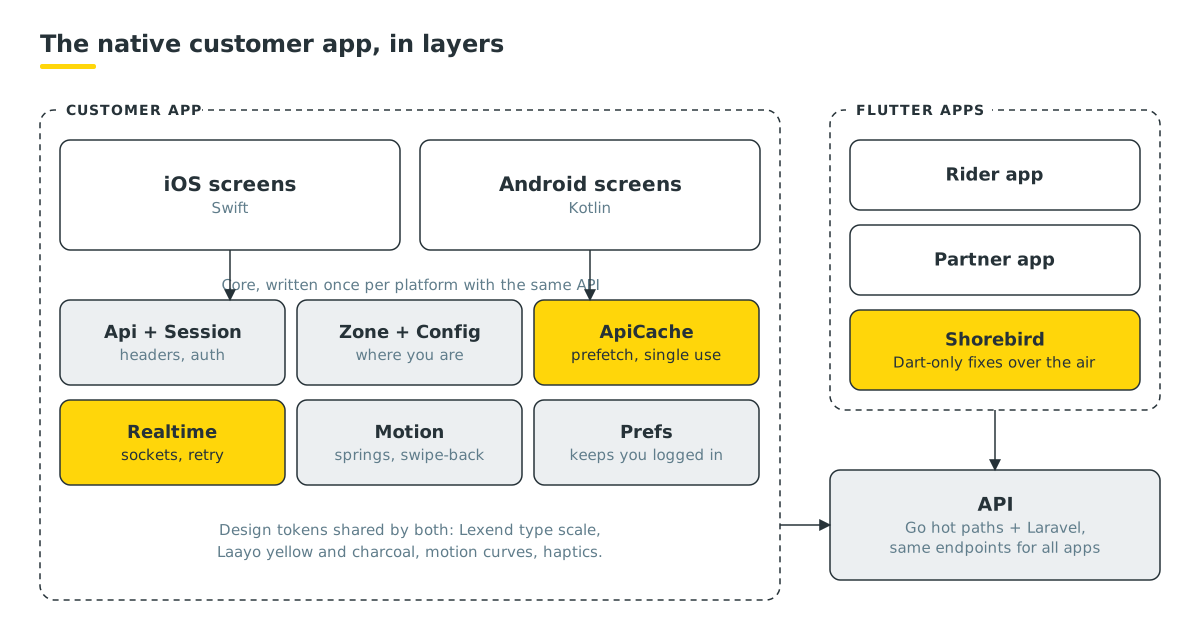
We chose two separate native codebases, with one shared design. Every core piece exists once in Swift and once in Kotlin, with the same names, the same API shape and the same behaviour, written from one spec. The reasons:
- Each app uses its platform’s own tools, debugger and libraries with no bridge in between.
- A bug on one platform cannot ship to the other by accident.
- Anyone who knows Swift or Kotlin can work on the app without learning a third toolchain.
The cost is writing core logic twice. We accept it because the core is a small part of the app, and keeping both versions behind the same spec makes the second one fast to write.
Moving without a big bang#
We did not stop and rewrite. The app moved in stages, and customers had a working app at every step.
- Native screens inside the Flutter app. We rebuilt screens natively one at a time and showed them from inside the existing Flutter app. Store pages, cart, checkout, tracking and the rest moved across while Flutter still handled start-up, navigation and data.
- A native data layer. Next came the core underneath the screens: API client, session, location and zone, configuration, cart, payments and realtime. For a while both the Flutter code and the native code could load data, and a switch on the server let us choose which one each module used. If a native module misbehaved, we could flip it back without an app update.
- A native shell. Then app start, routing, deep links and the tab bar became native too, so screens no longer needed Flutter to open them.
- Removing Flutter. Finally, the Flutter engine came out of the customer app entirely.
The hardest part of the last step was making sure nobody noticed it. Flutter apps store their data, such as the login token, saved address and cart, in their own format. The native app reads that data on first launch and carries it over, so customers updating from the old app stay logged in with their cart intact.
The Core#
The Core is the set of shared building blocks every screen relies on. A few of them:
- Api and Session. One client that sends the right headers for your zone, module, language and login on every request.
- Zone and Config. Where you are, which services deliver there, and the server settings the app needs.
- ApiCache and Prefetch. When you scroll the home screen and a store card has been visible for a moment, or you start to touch it, the app quietly starts loading that store page. If you tap, the page is often ready before the transition finishes. Prefetched answers are used once and expire quickly, so you never see stale data. Prefetching turns itself off when your phone is in Low Data or Data Saver mode.
- Realtime. The shared WebSocket client described in part three.
- Prefs. Local settings storage, including the migration from the Flutter app.
Server work supports this. The home bundle from part two lets the home screen load in one request instead of seven, and images come as WebP copies sized for how they are shown.
Motion and feel#
“Feels native” is mostly about motion, so we treated it as a feature with its own spec rather than polish for later. A shared Motion module in Core gives every screen the same spring curves, so nothing moves on its own timing. On top of that:
- Interactive swipe-back. On iOS you can swipe back from anywhere on the screen, and the gesture follows your finger. On Android the app supports predictive back.
- Shared transitions. When you open a store, the card lifts and the page grows out of it. The header is drawn from the card’s data on the first frame, so only the dish list shows a loading skeleton.
- Sheets. Bottom sheets open on a spring and can be dragged down to close.
- Quiet feedback. Rows dim slightly when pressed and buttons change opacity. We deliberately avoided bouncy scale effects, and haptics stay calm.
- Respect the system. Reduce Motion is honoured, high refresh rate screens get high refresh rate animation, and dropped frames are logged so we can find janky screens.
Type and colour#
Both apps share one set of design tokens: Laayo yellow and charcoal, spacing, corner radii and a type scale. The typeface is Lexend, an open-licence font designed for readability. We compared a range of open-licence fonts against the look we wanted and Lexend came out on top. Because our sizes were first tuned with a narrower font, a single size factor in Core keeps the visual sizes consistent across every screen.
Crash reports from day one#
Native code fails differently from Flutter code, so the native app shipped with crash reporting built in from its first release. Reports go to our own crash tracking server, covered in part five, with personal data turned off and no screenshots. Within hours of our first internal native builds it caught a layout loop on one screen that made the app hang for a few seconds. It was fixed before release.
Rider and partner apps stay on Flutter#
The rider and partner apps are tools people use all day for work. They change often, and they matter more for reliability than for smooth animation. Flutter suits them well, so they stay on Flutter.
For those apps we use Shorebird for over-the-air updates. When a fix only touches Dart code, we can publish a patch that reaches riders’ phones without a store release: first to a staging track for our own devices, then promoted to everyone. Native changes, new plugins and version bumps still go through the stores.
Going fully native means the customer app gave up over-the-air patches. Every customer app fix is now a store release. That trade-off was made with our eyes open, and it is one reason we invest in server-side switches. Much of the app’s behaviour can be adjusted from the server without a new build.
What’s next#
With the native shell in place, the next work is the remaining performance items on the list: faster first open for brand-new users, and more screens served by a single combined request.
In part five, the last part of the series, we look at how we watch all of this in production, from dashboards and per-route latency to crash reports, and at what is planned next for the backend.
This is part four of our series on Laayo’s tech stack.


