
Order alerts riders cannot miss
An order that nobody sees is an order that gets cancelled. How we traced every way a new order alert could go silent, and the receipts that now tell us when one did.

There is a particular kind of cancelled order that hurts more than the others. The restaurant accepted it. The food was cooking. A rider was free and nearby. And yet nobody picked it up, because the rider whose phone should have rung never heard anything.
When we went through those orders one by one, the answer was rarely “the rider ignored it”. It was almost always “the rider never saw it”. This post is about how a new order alert reaches a rider’s phone, all the places it could quietly disappear, and how we made the alert hard to miss and easy to measure.
The path of an alert#
When an order needs a rider, the server picks the riders who should hear about it and sends each of them a push notification. On the phone, that push can land in three very different situations:
- The app is open. The app shows a full screen request with a ringing sound until the rider accepts or someone else takes it.
- The app is in the background or the screen is locked. The operating system shows the notification and plays its sound.
- The app has been closed or killed. The push has to wake the app up before anything can happen.
Each of those paths had its own way of failing.
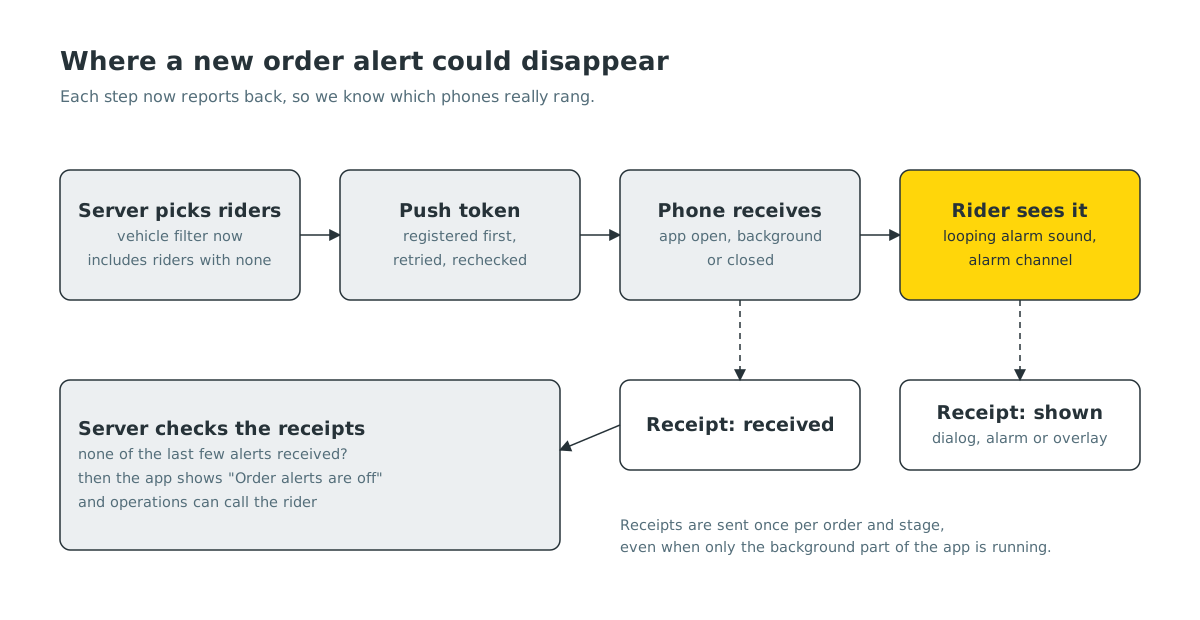
Four ways an alert went silent#
The phone was never registered. For a push to reach a phone, the app first has to tell our server its push token. The app did this only at one point during start up, and it waited for some slower setup steps to finish first. On iPhones those steps could fail right after launch, and with no internet they could hang. Either way the token was never sent, and there was no retry. Opening the app by tapping a notification skipped that start up step entirely.
The fix: the app now registers its token first, retries with time limits, and checks again whenever it comes back to the foreground. If the server says it has no working token for a rider, the app is told to register again straight away.
The app switched itself off. If the phone had blocked notifications, the home screen quietly turned off the app’s own “receive orders” setting as well. When the rider later allowed notifications again, nothing turned it back on. That automatic switch off is gone, and riders who had been caught by it get their setting restored once.
The server skipped some riders. Orders are offered to riders whose vehicle type matches the order. Riders without a vehicle type on their profile could see those orders in their feed, but the alert step filtered them out, so they were never rung. The server now includes them.
The sound played once, then stopped. In the background, Android plays a notification sound one time. A single short chime is easy to miss on a busy road. We made the new order sound keep playing while the app is in the background or the phone is locked, until the order is accepted, taken by another rider or cancelled. When the rider opens the app, the in app ringer takes over and the background one stops, so they never hear two rings at once.
Making the ring loud enough#
Hearing the alert is the next problem. Riders keep their phones on silent, in pockets, under rain covers. We added a dedicated alarm channel for new orders on Android. It uses the alarm volume rather than the media volume and a longer, clearer sound, and if a rider chooses to allow it, it can ring through Do Not Disturb. On iPhone we use a longer alert sound for the same reason.
Some phones are aggressive about stopping apps in the background to save battery. There is no way to switch that off from inside an app, so instead we built a “Set up your phone for orders” sheet. It checks each setting that matters and sends the rider directly to the right screen to fix it: notification permission, location “all the time”, battery and auto start settings for the major Android brands, Do Not Disturb access and whether the alarm volume is muted.
We also said no to a few tempting tricks. Full screen takeovers, special alert permissions and call style notifications are reserved by the app stores for calling and alarm apps. Using them for delivery orders would put the whole rider app at risk in review, so we stayed inside the rules.
Receipts: knowing instead of guessing#
All of the fixes above were based on reading code and reproducing problems on our own phones. That does not scale. We wanted every alert to report back.
So the rider app now sends small receipts for each new order alert:
- Received, when the push reached the phone, even in the background.
- Shown, when the alert actually appeared to the rider, along with where: the in app request, the background alarm or the floating overlay.
Receipts are cheap, sent once per order and stage, and written so they work even when the app is running only in the background. On the server they answer a question we could not answer before: for this order, which riders’ phones really rang?
They also feed the phone setup checks. If a rider has been sent several order alerts and none of them came back as received, the server tells the app that alerts are not reaching this phone, and the rider sees a clear “Order alerts are off” warning with the steps to fix it. Our operations team sees the same signal, so they know to call that rider before the dinner rush rather than after a cancelled order.
Most of the changes in this post, including the looping background ring, the alarm channel, the phone setup sheet and the receipts themselves, are rolling out with the next rider app update and the server release that goes with it.
Voices riders can understand#
Alerts are not only sounds. The rider app also speaks short prompts, such as asking for a photo of the packed order or telling a rider an order is ready to pick up. These used to be read out by the phone’s built in voice, which made Nepali sound robotic and sometimes hard to follow.
We now generate each prompt once on the server with a neural text to speech voice tuned for warm, natural Nepali, store the audio file and serve the same file to every rider. It costs almost nothing because each line is generated a single time. If the phone is offline, the app falls back to the on device voice, so a prompt is never skipped.
What’s next#
Receipts give us a delivery report for every alert. Next we will use them to spot patterns, such as phone models, app versions or areas where alerts arrive late, and to decide when an order should be offered to more riders because the first ones clearly did not hear it.


