
Ordering together, without passing one phone around the table
Group orders let everyone add their own food from their own phone, while one person checks out and pays. Here is how the link, the timer and the host controls work.

Every office has the lunch ritual. Someone says “let’s order”, a phone goes around the table, everyone scrolls the same menu with someone else’s thumb, and the person who started it ends up retyping half the list because somebody wanted extra cheese. At a birthday at home it is the same, except louder.
Group orders on Laayo are our answer. One person starts the order, shares a link, and everyone adds what they want from their own phone. When the food list is complete, the host checks out once, pays once, and one rider brings everything.
How it works#
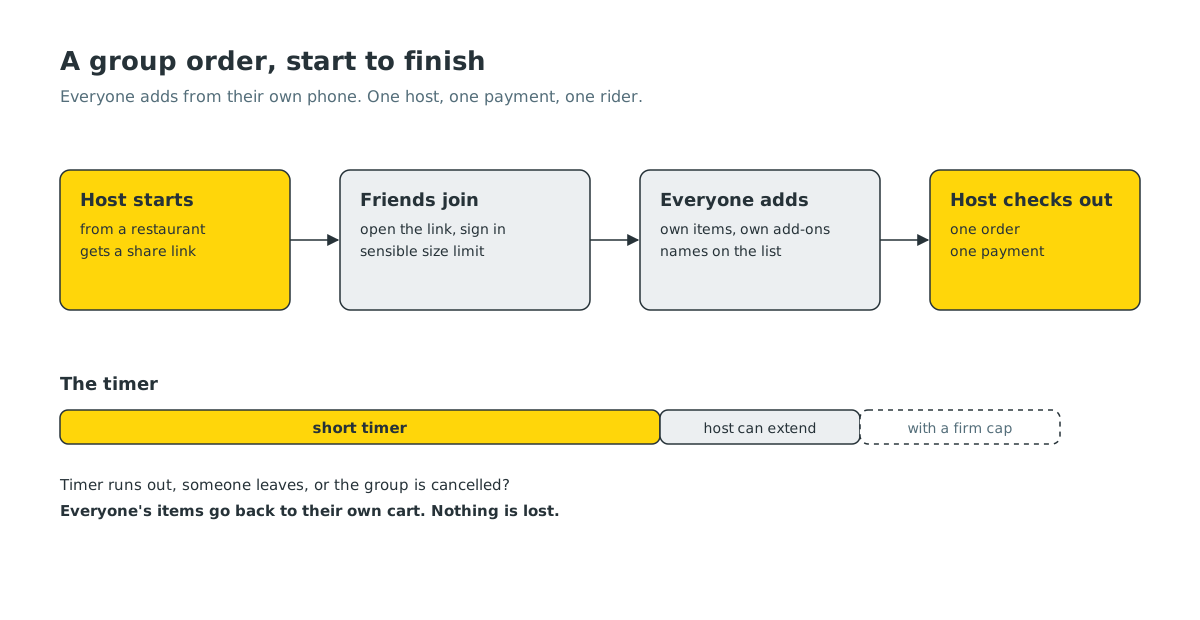
- Start. Open a restaurant and tap Start group order. The group gets a name, “your name’s group order” by default, which you can change.
- Share. Send the link on WhatsApp, Viber or anywhere else. Anyone who opens it and is signed in to Laayo joins the group.
- Add. Each person browses the same menu and adds their own items, with their own sizes and add-ons. Everyone sees the shared list, with names next to items, so nobody orders the same thing twice by accident.
- Check out. The host taps Proceed to cart. Everyone’s items move into the host’s cart as one order, the host picks the address and payment, and places it.
When someone joins or adds an item, the host gets a notification. When the host starts checking out, everyone else gets one too: the order is about to be placed, so speak now.
The timer#
A group order is open for 30 minutes. That sounds strict, and it is meant to. Without a deadline, group orders drift. People add something, wander off, come back an hour later, and the restaurant has closed.
The host can add 10 more minutes with one tap if someone is still deciding, up to an hour in total from when the group started. Everyone in the group sees the countdown, so nobody is surprised when it closes.
If the timer runs out before checkout, nobody loses their choices. Each person’s items go back into their own cart, and they get a message saying so. They can order on their own, or start a new group.
The host is in charge#
Group orders need one person who decides, otherwise they fall apart. So a few things only the host can do:
- Place the order and pay for it. One order, one payment, one delivery fee.
- Apply a coupon. The coupon is checked again at the moment of checkout, so if the total has dropped below the coupon’s minimum, or the code was used elsewhere in the meantime, you find out before paying, not after.
- Extend the timer, rename the group or delete it.
- Remove someone or one of their items. Sometimes a link travels further than intended. The removed person is told, and their items are returned to their own cart.
Anyone who is not the host can leave at any time. Their items go back to their personal cart.
Details that took longer than they look#
- Your cart is safe. If you already had items from that restaurant in your cart when you started a group, they become your items in the group. If the group is cancelled, they come back.
- Backing out of checkout is fine. If the host taps Proceed to cart and then leaves without paying, the group opens again the next time they come back to it, with everyone’s items intact.
- Double taps do not create two groups. Tapping Start twice on the same restaurant takes you back to the group you already have.
- The restaurant has to be open. We check this on our side as well as in the app, so a group cannot get stuck halfway through checkout because the kitchen closed.
- Groups have a sensible size limit. Up to 50 people can join one group order, which covers the biggest office lunch we have seen and keeps a link that gets forwarded too widely from becoming a problem.
What we chose not to do#
- No split payments, yet. Splitting a bill sounds simple until one person’s payment fails and the whole order is stuck. For now, the host pays and settles up with friends the way people already do. We would rather the order always go through.
- No guest joining without signing in. Every item in a group belongs to a real person, so we can return it to their cart, notify them and keep the list honest. Signing in takes a few seconds with your mobile number.
- One restaurant per group. Mixing restaurants in a group means multiple riders and multiple timers. Keeping it to one restaurant keeps the food arriving together and hot.
What’s next#
We are watching how people use the timer and the host controls, and we will tune both. If your team uses group orders for lunch every week, tell us what would make it faster. We are listening.


