
Refunds you can follow, and invoices you can keep
A refund is a promise, and promises about money need dates. A refund timeline on your order, and proper PDF invoices, are coming in the next update.

When an order goes wrong and we agree to refund you, there is a quiet stretch between “sorry, we’ll refund you” and the money actually arriving. For a wallet refund that stretch is zero. For a refund to your bank or QR account it can be a few days. And during those days, the only way to know what is happening is to open a support chat and ask.
That gap is exactly where people start messaging support with the same question: has my refund gone? Each of those messages is a customer who is already unhappy, waiting on hold to find out something we could have shown them. So we decided to show it.
A refund timeline on your order#
In the next update, when a refund is agreed for one of your orders, the order page shows a small timeline above the rider details.
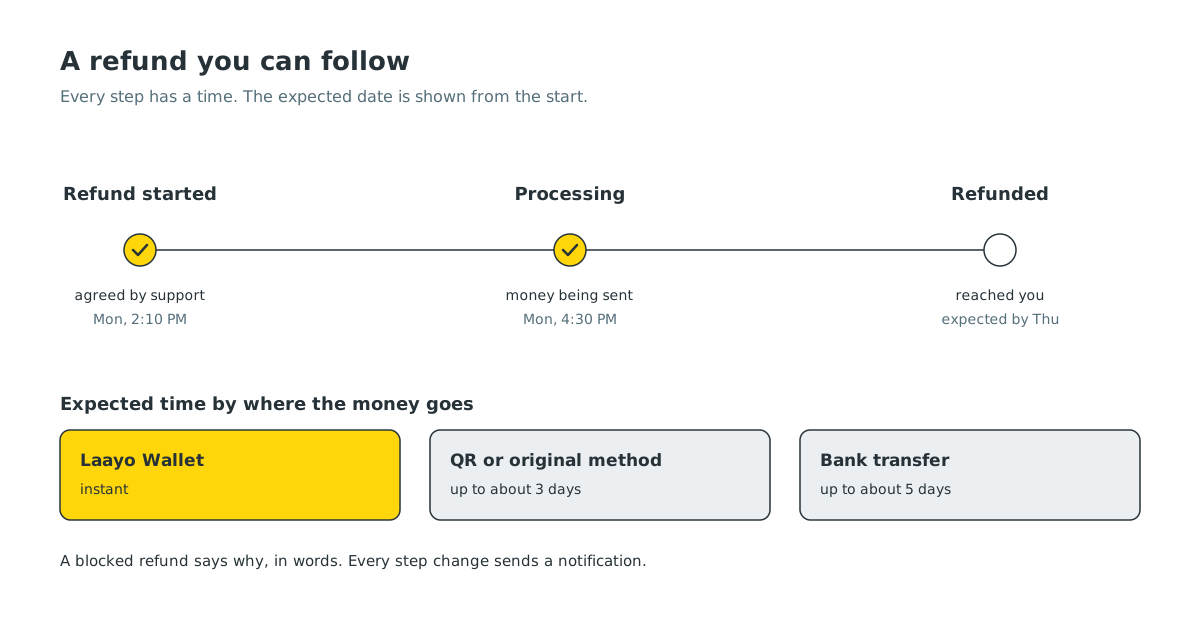
It has the same steps every time:
- Refund started. Our support team has agreed the refund and recorded where it is going.
- Processing. The money is being sent.
- Refunded. It has reached you.
Each step that has happened is ticked and shows the date and time. From the very first step, the timeline also shows when you should expect the money, so you are not left guessing. As a rough guide, a refund to your Laayo Wallet is instant, a refund to a QR or the original payment method takes up to about three days, and a bank transfer up to about five.
Every time a step changes, you get a notification. On the order history list, the card for that order gets a one line summary like Refund of रु 240 on its way, so you can see it without opening anything.
If something blocks a refund, for example a bank account number that does not work, the timeline says so, in words, with the reason. A refund that silently fails is worse than one that says what went wrong.
Why this is server driven#
The words on the timeline are written by our server, in English and Nepali, not built into the app. That matters for two reasons. First, the timeline is a promise about somebody’s money, and if we ever word something badly we need to fix it the same day, not in the next app release. Second, Nepali and English put dates and times together differently. In Nepali, “बजे” comes after the time, so a translation that simply glues an English “at” between the date and time reads as nonsense. We format both languages properly.
Wallet refunds get the timeline too#
A refund to your Laayo Wallet is instant, so it shows up already completed. We still show it the same way, because one consistent picture is easier to trust than two different ones.
Invoices you can actually use#
The other money question we hear is from people who need a proper record: someone ordering lunch for an office, a small business buying supplies, or anyone who just likes to keep receipts.
In the next update, every order gets two downloads:
- Order summary, available on every order, delivered or not, with the items, charges, discounts and what you paid.
- Invoice, available once an order is delivered, as a PDF in two parts:
- the restaurant’s invoice for the food, issued on their behalf with their PAN number,
- Laayo’s own invoice for the delivery and platform fee, shown only if there was one.
Each invoice has a clear number that includes the Nepali fiscal year, so it is easy to file. Discounts are spread across the items properly, down to the paisa, so the columns add up exactly to what you paid. If there is a tiny rounding difference, it appears as its own line instead of hiding inside a total.
We call it an Invoice, not a “Tax Invoice”. Tax columns only appear when the restaurant actually charges tax on that order. We would rather a document be plain and correct than look official and be wrong.
What we chose not to do#
- No vague “3 to 7 working days”. Every refund shows a specific expected date from the moment it starts.
- No refund status hidden inside a support chat. The timeline lives on the order, where you would look for it.
- No invoice before delivery. Until the food arrives, an invoice would describe a sale that has not happened. The order summary covers that time.
- No extra screens to choose a document. The Download invoice button gives you the invoice, and the small download icon next to the bill gives you the summary.
What’s next#
Both features are coming in the next app update. Our goal is fewer moments where you have to ask us where your money is. If you ever do have to ask, the support team now sees the same timeline you do, so the answer is one glance away.


