
Twenty metres off: getting the address pin right
Two small bugs in our map picker could put a delivery address down the street, or at a place the customer never chose. Here is how we found them and the rule we now follow for every map.

In a town without house numbers on every gate, the pin on a map is the address. A customer in Birtamod or Damak might write “behind the blue school, second lane” in the notes, but the rider’s app navigates to the coordinate. If the coordinate is wrong, everything after it is wrong too: the delivery fee, the estimated time, and the phone call where a rider asks “where exactly are you?”
This autumn we found two separate problems in how our app picks that coordinate. Neither was dramatic. Both quietly cost riders and customers time every day.
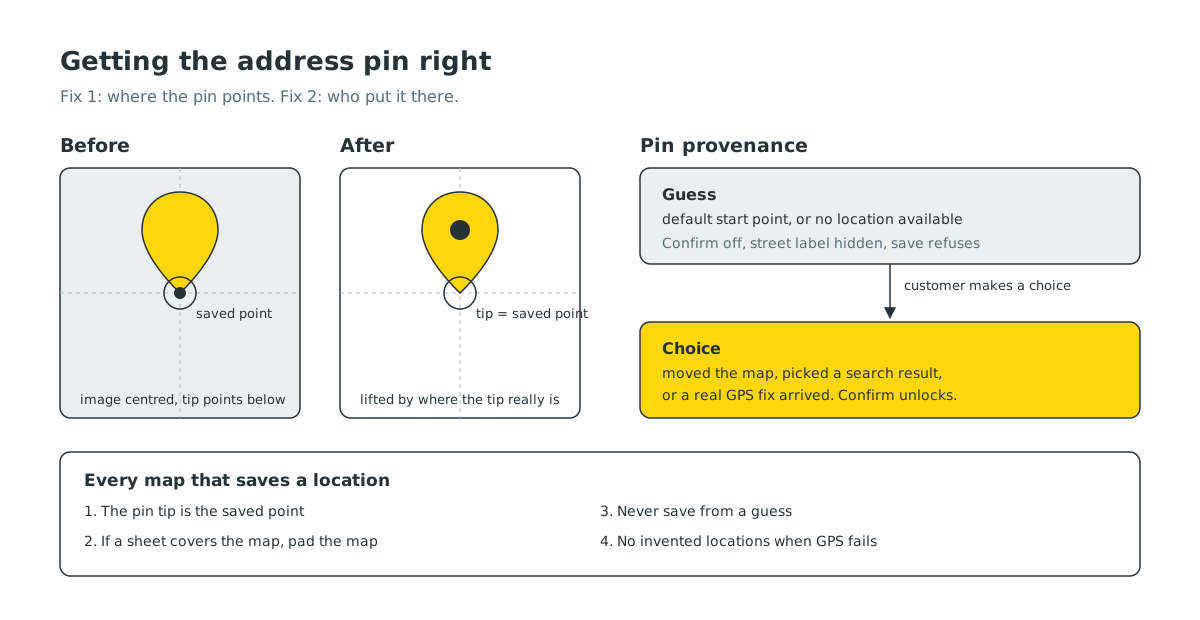
Bug one: the pin pointed below the saved spot#
Our address picker works like most: the map moves under a pin that stays fixed in the middle of the screen. When you tap Confirm, we save the point at the centre of the map.
The pin is an image. When you centre an image, you centre the whole picture, not its tip. A map pin’s tip is at the bottom of the image, so with the image centred, the tip pointed roughly half the pin’s height below the point we were actually saving. Customers did exactly what we asked: they put the tip on their door. We saved a point a little way up the street.
How far? At the zoom level people use to pick a house, it worked out to around twenty metres. In a dense neighbourhood that is the next building, or the other side of a lane.
The fix is to lift the image so its tip, not its centre, sits on the saved point. The detail that matters is where the tip actually is in each image. Our current pin has a small shadow under it, so the tip is not at the very bottom edge but a bit above it. We measured each pin asset and lift it by exactly that amount.
One more case needed care. On the add address screen, a sheet with the address form covers the lower part of the map. If you centre the pin in the full map, the pin and the saved point drift apart again. So we tell the map about the sheet, the map shifts its centre into the visible area, and the pin is centred inside that same area.
Bug two: a pin nobody chose#
The second problem was harder to see, because it only happened when something else failed.
When the app needs to show a map and does not yet know where you are, it has to start somewhere. Ours started at a default point in town that comes from our settings. That is a reasonable place to start a map. It is a terrible place to save an address.
There were two ways that default point could become someone’s delivery address:
- When GPS failed, an old helper quietly returned the default point as if it were your real location. Everything downstream treated it as real.
- When the map first settled, the picker armed the Confirm button from wherever the camera was, even if the camera was only there because we put it there.
The result: a customer opens the map, GPS is slow, they see a pin, they tap Confirm without looking closely, and their saved address is now a spot they have never been to. A rider then drives to it.
The rule: provenance, not geography#
The tempting fix is to block coordinates near the default point. That does not work in a town where real customers live right next to it. The real question is not where the pin is, but who put it there.
So the app now tracks where every pin came from:
- A guess is any pin the app placed itself: the default starting point, or a fallback when location is unavailable.
- A choice is a pin the customer moved more than a few tens of metres, picked from search results, or got from a real GPS fix.
While the pin is a guess, the Confirm button is disabled, the street name under the pin is hidden so it does not look confirmed, and the save itself refuses even if something tries to call it. The moment the customer makes a choice, all three unlock.
The old helper that invented a location when GPS failed now returns nothing, and every screen that used it handles “no location yet” properly instead of assuming one exists.
Searching for places nearby first#
Picking a pin is only half the job. Most people search first, and search results need to make sense for a small town.
We changed place search so that results are biased towards where you are, sorted by distance and shown with that distance, so “City Center” from Birtamod shows the one a kilometre away first rather than one in another city. When nothing nearby matches a typed name, which happens with local spellings, we fall back to a broader text search before giving up. A loosely typed shop name can still find the right place a few hundred metres away.
Your saved addresses appear at the top of the search sheet as recent locations, each with its distance from where you are now, because for most orders the right answer is somewhere you have already been.
The map in the picker also shows the names of nearby places like shops, schools and temples with muted icons, since those are what people actually use to orient themselves here.
The rule for every new map#
These fixes now form a checklist we apply to any map that can save a location, in any of our apps:
- The pin tip is the saved point. Measure the asset and lift it.
- If anything covers the map, pad the map. The pin and the saved point must be centred in the same visible area.
- Never seed a save from a guess. Start from the customer’s own saved address if there is one. If the start is a fallback, mark it as a guess and keep Confirm disabled until the customer makes a choice.
- No invented locations. If we do not know where someone is, we say so.
Place search with distance is already live. The picker changes are rolling out in app updates. They do not add a single new screen. They just make sure that when a customer puts the tip of the pin on their door, the rider goes to that door.


