
Laayo's tech stack, part five: seeing what happens
The dashboards, metrics and crash reports we use to know how Laayo is doing right now, and what is planned next for the backend.

Every earlier part of this series ends with some version of “and then we measured it”. Shadow mode in part two only works because we can see how often Go and Laravel agree. The realtime work in part three only counts if events really arrive in under a second. A smoother native app in part four is only smoother if it does not crash more.
For a long time, our answer to “is Laayo healthy right now?” was a mix of server logs, the admin panel and messages from riders and partners. That works when you are small. It stops working when you change the backend every day and need to know within minutes whether a change made things better or worse.
This last part covers how we watch the system today, and the backend work that is planned next.
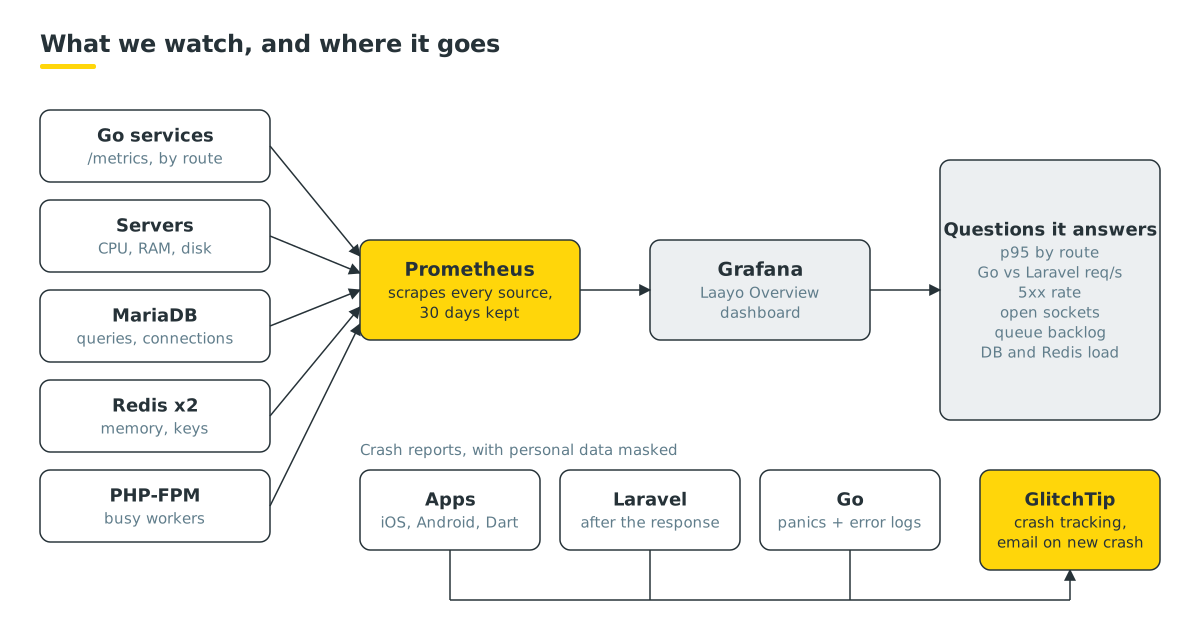
Metrics: Prometheus and Grafana#
We run Prometheus to collect metrics and Grafana to show them. Both are self-hosted, run in containers next to the rest of the stack and are not reachable from the public internet. Prometheus keeps 30 days of history, which is enough to compare this Friday’s dinner rush with the last few.
Prometheus pulls metrics from a set of exporters, each a small program that turns one system’s internal numbers into metrics:
- Server. CPU, load, memory, disk and network.
- MariaDB. Queries per second, connections and slow queries. Its exporter logs in with its own limited account, separate from the app.
- Redis, twice. One exporter for the live Redis and one for the cache Redis from part one, so we can see memory and evictions for each role separately.
- PHP-FPM. How many Laravel workers are busy and how many requests are waiting for one. This is the most honest early warning we have: when waiting requests climb, customers feel it a few seconds later.
Metrics from our own Go services#
The Go services from parts two and three expose their own metrics. We wrote the metrics output by hand instead of pulling in a library. The format is simple text, and keeping the services free of extra dependencies was worth a few dozen lines.
The API service counts every request with three labels: the route, the status code, and served_by, meaning whether Go answered, Go served a saved copy or Laravel handled it. Next to the counters is a latency histogram per route, which gives us p95 by route: the time within which 95 percent of requests finish. Averages hide the slow requests that customers remember, so p95 is the number we set targets on.
The realtime service reports open connections, channels, subscribers and live trackers, so we can see dinner time arrive as a wave of sockets.
One dashboard first#
We resisted building many dashboards. There is one main dashboard, Laayo Overview, and it tries to answer “is something wrong right now?” in a single screen:
| Panel | Why it is there |
|---|---|
| CPU, load, memory, disk | the machine itself |
| Laravel workers busy and waiting | the first sign of slowness |
| Requests per second, Go versus Laravel | how much traffic the fast path carries |
| p95 latency by route | which endpoint got slower, not just that something did |
| 5xx responses | errors, by route |
| Open sockets | realtime health |
| MariaDB queries and connections | database pressure |
| Redis memory | both roles, side by side |
When we ship a change, we watch this dashboard for the next few minutes. Most bad deploys show up here as a step change in one panel before anyone files a complaint.
Crash reports: GlitchTip#
Metrics tell us that something is wrong. Crash reports tell us what went wrong, with a stack trace. We self-host GlitchTip, an open-source crash tracker that speaks the same protocol as Sentry, so standard Sentry SDKs work with it. Self-hosting keeps costs predictable and keeps crash data on our own infrastructure.
We have one project per source:
- Customer app, iOS and Android, using the standard Sentry SDKs. Personal data, screenshots and view hierarchies are turned off. Reports are tied to the exact app version and build, so we know which release a crash belongs to.
- Rider and partner apps, with a small reporter written in pure Dart. It only runs in release builds and keeps a short offline queue, because riders often lose signal between drops. Being pure Dart means it can ship as an over-the-air patch.
- Laravel, reporting from the framework’s error handler. Reports are sent after the response has gone back to the user, so reporting never slows a request down. Email addresses and long digit runs such as phone numbers are masked before anything leaves the server.
- Go, where we again skipped the SDK. A small package catches panics, wraps every handler and turns error-level logs into reports, with de-duplication and a rate limit so one broken loop cannot flood the tracker.
Every project has the same alert rule: a new kind of crash sends an email right away. Repeats of a known crash do not, which keeps the inbox meaningful.
It paid off quickly. In its first day the tracker caught a layout loop in a native screen during internal testing, and it confirmed that a short database blip early one morning caused errors in exactly two requests and nothing else. Knowing the blast radius of an incident is often more useful than knowing it happened.
Habits that keep the signals clean#
Tools only help if the signal stays clean. A few habits we hold ourselves to:
- Test noise is labelled. Every report carries its environment, and work on our tests server is never mistaken for production.
- Measure before and after. Every speed change in this series has a before and after number, taken the same way. If we cannot measure it, we do not claim it.
What’s next for the backend#
We set ourselves four targets: API p95 under 150 ms, the app feeling open in under a second, order status and rider pins on screen in under a second, and store and menu changes visible in under five seconds. Parts two and three got us most of the way. Here is what is live now and what is planned.
Live: dedicated search. Dish and store search now runs on Meilisearch. A sync job sends only changed items and stores every minute. It understands the spellings people actually type, so “briyani” still finds biryani and “mo:mo” finds momo. Search has a strict time budget: if Meilisearch is slow or down, the app falls back to the previous database search instead of waiting.
Planned: H3 for location. Today, delivery areas and nearby riders are worked out with polygons and radius queries. We plan to add H3, a hexagonal grid system, so questions like “which riders are near this restaurant” or “how busy is this neighbourhood” become cheap lookups. That matters most for dispatch and for understanding demand across a town.
Planned: Redis Streams for order events. Today, features react to order changes on their own. We plan to publish every order event to a durable stream, so dispatch, notifications and analytics each read the same ordered log at their own pace, and nothing is lost if a consumer restarts.
Planned: a database read copy. Reports and heavy admin pages read from the same database that takes orders. A read copy on a second server will move that load away from the order path. This needs new hardware, so it comes after the next server is in place.
We will write about each of these when it ships, with numbers.
Thanks for reading#
That is the end of the series. We started with a monolith on a small footprint, put Go on the hot paths without a rewrite, made the important things realtime, moved the customer app to native code, and built ways to see whether any of it worked.
If you are an engineer in Nepal who likes this kind of work, building fast software for towns that are usually last in line, we would love to hear from you.
This is part five of our series on Laayo’s tech stack.


