
A whole menu from one photo
Typing in a restaurant menu by hand could take an afternoon. Now our team drops in a photo or a PDF of the menu, checks what the AI read, and has the restaurant ready in minutes.

Before a restaurant can take its first order on Laayo, its menu has to exist on Laayo. Every dish, every size, every price. For a small momo shop that might be twenty items. For a family restaurant with a Nepali, Indian, Chinese and continental section, it can easily be two hundred.
For a long time, that meant someone on our team sitting with a printed menu, a laptop and a lot of patience. Steamed buff momo, half plate, full plate. Fried buff momo, half plate, full plate. Then the same again for chicken. Then for veg. It was slow, it was easy to make mistakes, and it was the single biggest reason a new partner had to wait before going live.
So we built a tool that reads the menu for us.
Drop in the menu#
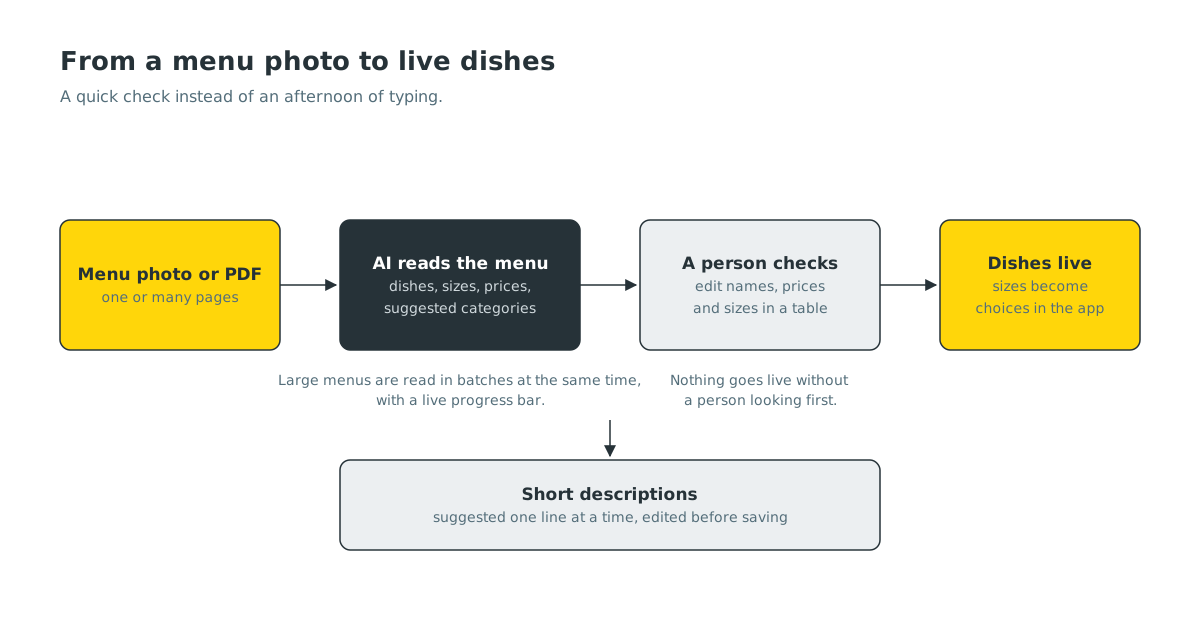
The AI menu upload lives in our admin panel. It is built like a chat: you drop in the restaurant’s menu, as one or more photos or as a PDF, and it replies with what it found.
Behind the scenes, each page of the menu is sent to a vision model that reads it the way a person would. It understands section headings, so it knows that “Chowmein” under “Chicken” means chicken chowmein. It picks up sizes and portions, half and full plates, small and large, and their prices. It also suggests which Laayo category each dish belongs in.
Large menus are split into batches that are read at the same time, so a ten page menu does not take ten times as long. While it works, the chat shows a live progress bar: pages prepared, batches done and how many dishes it has found so far.
A person always checks#
AI is very good at reading menus, but it is not perfect. Handwritten specials, faded print, a price that sits awkwardly between two dishes: any of these can trip it up. So nothing goes live without a person looking at it first.
When the reading is done, the results appear in an editable table. Every row is one dish, with its name, category, price and sizes. Our team can:
- fix a name or a price with one click,
- open a dish to edit its sizes, for example “Half plate” and “Full plate”, each with its own price,
- remove anything that is not really a dish, like a heading that slipped through,
- move a dish to a different category.
Only when the table looks right does anyone press the button that creates the dishes on the restaurant’s menu. Sizes become proper choices in the app, so a customer ordering a full plate sees the right price straight away.
Descriptions that help people choose#
A dish name alone is often not enough. “Chef’s special thali” could be almost anything. Good short descriptions help customers order with confidence, and they help search find the dish when someone types what they are craving rather than the exact name.
Many dishes on Laayo had no description at all, so we added a companion tool that writes short ones. It lists dishes without a description, our team can generate a suggestion for one dish or a whole page at once, and every suggestion can be edited before it is saved. We keep them short on purpose: one clear line about what is in the dish, not a paragraph of adjectives.
Where the menu photo comes from#
This tool fits neatly with the new partner sign-up. When a restaurant applies through the Laayo app, one of the steps asks for photos of the menu, and those files go straight into the restaurant’s documents. By the time our team picks up the application, the menu is already there, ready to be dropped into the upload tool.
The result is a much shorter path from “I would like to join” to “your first order is here”:
- The owner applies in the app and attaches the menu.
- Our team reviews the application.
- The menu is read in minutes and checked by a person.
- The restaurant goes live.
Why we care about speed here#
For a restaurant, the days between deciding to join and taking the first order are the most fragile. Excitement fades if nothing happens. Menus change. Owners get busy. Every day we shave off that wait makes it more likely the partnership actually starts.
For us, it frees our team to spend their time where people are needed: visiting restaurants, taking good photos of dishes, explaining how Laayo works and listening to what partners need. Typing in prices was never the best use of anyone’s afternoon.
Keeping menus fresh#
Menus do not stand still. Prices change, dishes come and go, and specials appear for festivals. When a partner sends us a new menu, the same tool reads it and our team checks it against what is on Laayo, so updating a menu is no longer a chore that waits for a quiet day.
If you are a partner and your menu has changed, send us a clear photo through partner support. It will not take us an afternoon any more.


