
Designing Laayo in yellow
A new wordmark, two colours, one typeface and a handful of rules about motion and loading. How we are making every Laayo screen feel like the same calm, fast app.

A delivery app is used in small, impatient moments. You open it hungry, you scroll for a minute, you pay, and then you glance at it every few minutes until the food arrives. In those moments, nobody admires a gradient. What people notice is whether the app feels quick, whether it is clear what to tap, and whether it ever makes them feel unsure.
This autumn we reworked how Laayo looks and moves. Here is what changed and the thinking behind it.
A new wordmark#
At the end of September we introduced a new logo. It is a wordmark: “la” in charcoal, followed by a slanted charcoal badge with “ayo” in yellow. The slant gives it a sense of motion without drawing a scooter, a rider or a parcel. Those pictures date quickly, and they all look alike across delivery apps.
The wordmark now appears everywhere: the app icon, the websites, emails and receipts. For small spaces like a browser tab we use a compact mark, a single yellow “a” from the badge on a charcoal rounded square. It stays readable at 16 pixels, where a full wordmark becomes a smudge.
The rider app keeps its own helmet mark on yellow, so when a rider glances at their phone mid-ride it is instantly clear which app is buzzing.
Two colours, used with discipline#
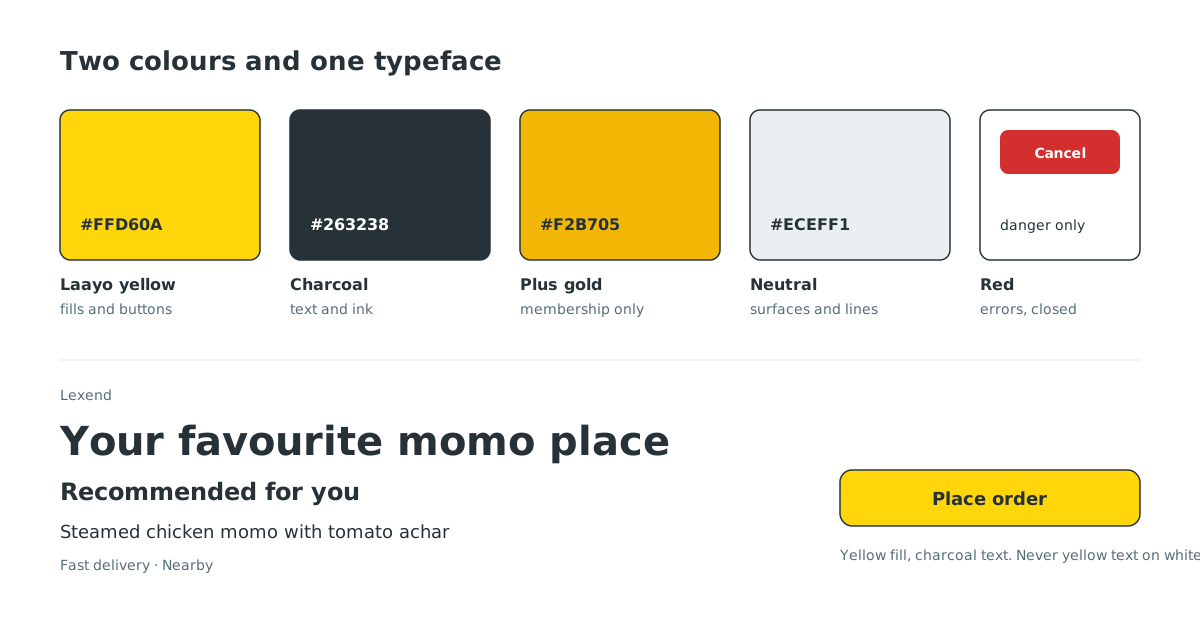
Laayo is yellow #FFD60A and charcoal #263238. Almost everything else is neutral.
- Yellow is for filling, not for writing. Main buttons, the selected tab, highlights and badges get a yellow fill with charcoal text. We never put yellow text on a white background. It looks bright on a designer’s monitor and disappears on a cheap phone in afternoon sun.
- Charcoal is our ink. Headings, links and important text use charcoal, not pure black. It is softer on the eye and pairs with the yellow.
- Gold #F2B705 belongs to Laayo Plus. Members can tell their perks apart at a glance.
- Red is only for danger. Delete, cancel, errors, a required field, a closed store. If red appears on a Laayo screen, something needs your attention. We do not spend it on decoration.
That last rule sounds small, but it took the most effort. Food apps love red, and it kept creeping into our screens through reference designs and old components. Each time we found it we replaced it, because a colour that means “danger” cannot also mean “tasty”.
One typeface: Lexend#
For the apps and the website we use Lexend, an open licence typeface designed around readability research. It has open letter shapes, generous spacing and a tall x-height, which means small text like prices, delivery times and item descriptions stays clear on small screens.
We tested more than a dozen open licence fonts against the look we wanted, measuring how closely their shapes matched at real app sizes. Lexend came out on top and also has a full set of weights, so one family covers everything from a bold restaurant name to a light caption. Because Lexend sets slightly wider than our previous font, we scaled our type sizes down by a small factor in one central place, so every screen kept its layout without anyone retuning hundreds of sizes by hand.
Status without the pastel#
A common pattern in app design is the status pill: a soft pastel background, text in a darker shade of the same colour, and a border in a third shade. “Delivered” in green on light green. “Pending” in amber on light amber. It is everywhere, and at small sizes the three tints blur together.
We do not use it. A status on Laayo is either:
- Typographic: a small coloured mark, like a tick or a dot, next to a plain charcoal label. Bold for an outcome, lighter for something still waiting.
- A solid badge: a fully saturated fill with white bold text, used only when a status has to stand out in a busy list.
Loading that feels like progress#
Nothing makes an app feel slower than a blank screen with a spinning circle in the middle. We replaced generic spinners with two things:
- For a full page: the outline of the page appears first, a soft skeleton of where the photos and text will be, with a short food line and a thin two-arc Laayo loader floating above it. You can already see the shape of what is coming.
- For a small section inside a page, like a row of restaurants on the home screen, a plain shimmer, so the rest of the page is usable while one row fills in.
Pull to refresh uses the same two-arc loader in a small round badge. One loading language, everywhere.
Motion that gets out of the way#
We are moving the customer app to fully native code on iPhone and Android, and motion was one of the reasons. Native gives us the system’s own physics:
- Swipe back from anywhere on the screen edge, following your finger.
- Sheets that spring up and can be dragged down to dismiss.
- Shared transitions where a restaurant card lifts slightly and becomes the restaurant page, with the header already filled in from the card, so only the menu needs to load.
- High refresh rate where the phone supports it.
Just as important is what we removed. No bouncing or shrinking buttons on press. A row dims slightly when you touch it and a button fades a little. That is enough to say “got it” without making the screen feel jumpy. Everything respects the system’s Reduce Motion setting.
Calm haptics#
Vibration is the easiest way to make an app feel nervous. An early version of one of our screens buzzed five times during an animation and once more at the end. It felt rushed.
Our rule now: at most one gentle haptic per deliberate action. A tap, an add to cart, a send. A slightly firmer one only for a real commitment, like placing an order. Never a haptic tied to an animation, a timer or something arriving in the background. Your phone should only tap your hand when you did something.
What we are not doing#
We are just as clear about what Laayo should not look like: no floating 3D emoji, no purple night-sky gradients, no glows, no novelty display fonts, no pastel cards tilting at angles. Those are easy to make and they make every app look the same. Our screens use real food photos, flat colour, thin hairline borders and our own illustrations.
The goal is not for anyone to notice the design. It is for them to notice that Laayo feels quick, clear and calm, and that their food is on the way.


