
Loading without lying
A loading screen makes promises. Here are the rules we use so that what you see while Laayo loads is never wrong, never jumpy and never thrown away for no reason.

Most of the time you spend looking at a delivery app is spent waiting for it. The menu is loading, the fee is being worked out, the order list is refreshing. We used to treat those moments as gaps between real screens. They are not. A loading state is a screen too, and it can be right or wrong just like any other.
Earlier this month we wrote about how loading looks in the new Laayo: the outline of the page with a short food line and our two-arc loader above it. This post is about the less visible half: the rules that stop a loading state from telling you something untrue.
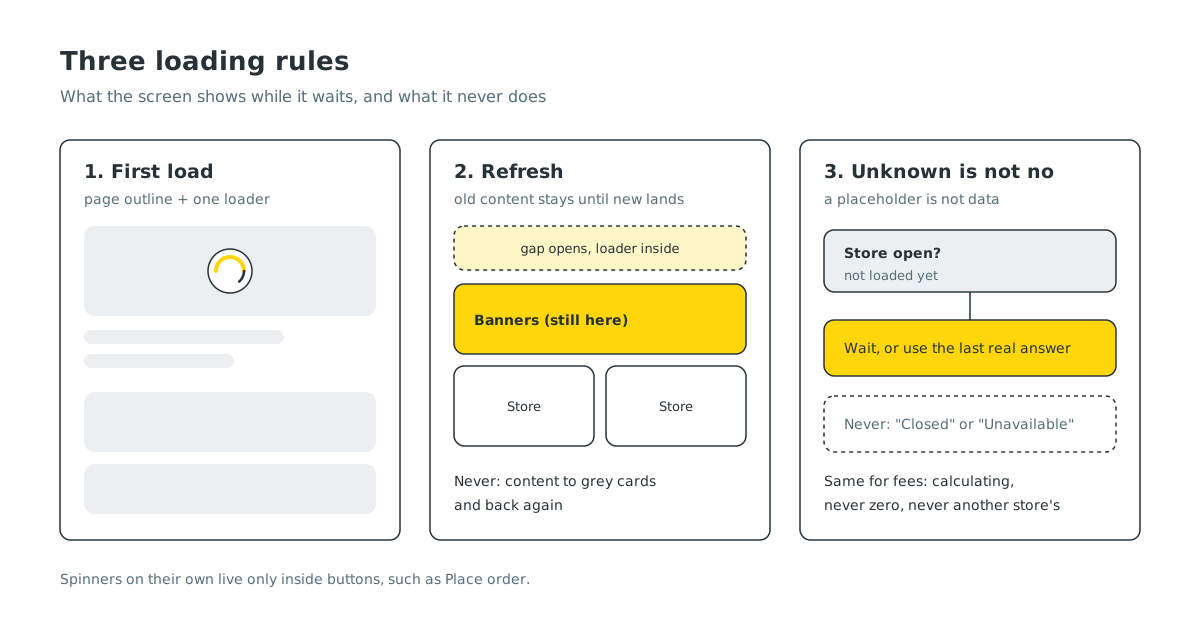
Rule one: a placeholder is not data#
When you tap a restaurant, the app often knows only a little about it: its id, maybe its name from the card you tapped. To open the page instantly, we build a lightweight stand-in for the store and fill in the rest when the server answers.
That stand-in caused one of the strangest bugs we have fixed. Items in your cart would flash a “Temporarily unavailable” overlay for a moment, then recover. Nothing was unavailable. Part of the app had looked up the store, found the stand-in, read its opening status, and since the stand-in did not know whether the store was open, the check concluded it was closed.
The fix was small, but the rule behind it matters more: unknown is not the same as no. Any code that reads a store now checks that the opening status has actually arrived before trusting it. If it has not, the app falls back to the last real answer, or simply waits. It never turns “I don’t know yet” into “closed”, “unavailable” or “out of range”.
We apply the same idea to money. A delivery fee that has not been calculated yet shows as calculating, not as zero and not as an old fee from a different restaurant.
Rule two: refresh never tears the page down#
Pull to refresh is a request for newer content. It is not a request to watch the current content disappear.
For a while, pulling down on the home screen did exactly that. The refresh cleared the banners, categories and restaurant rails first and then fetched them again. For a second or two you saw the top of the page sitting above a column of empty grey cards, as if the app had forgotten everything it knew.
Now every section keeps what it has until fresh data arrives, then swaps in place. You pull, a small gap opens under the top of the page with the Laayo loader in it, and the gap stays open for at least a short moment so it never flickers. When the new data lands, it replaces the old without a blank frame in between.
Two small details came from the same work:
- On iPhone, the page no longer bounces past the top. The pull opens the gap instead, which feels more deliberate.
- Pull to refresh looks the same everywhere in the app. We replaced every stock refresh spinner with the same round Laayo badge, so you never wonder whether a screen belongs to a different app.
Rule three: never show something just to take it away#
There is a pattern we now actively hunt for: a panel appears, sits on screen for half a second, then gets replaced by the next step. It usually starts with good intentions, a confirmation like “Found your business”, followed by a timer so the user can “see” it.
Nobody can read something in half a second. What people actually see is a flicker, and the flow feels slower because it is literally waiting on a timer. Our rule is to ask which step the information is needed on and put it there, permanently. If a confirmation matters, it stays visible on the next screen, next to the thing it confirms.
The same goes for warnings. A real warning that flashes and disappears is worse than no warning, because people notice something went wrong but cannot tell what. Warnings stay on screen as a quiet line until they no longer apply.
And only an unambiguous result may move you forward on its own. If there is exactly one match, we can advance. If there are two, that is a real decision, and the screen waits for you.
Rule four: skeletons in the right places only#
We do not use skeletons everywhere. For a whole page or a whole list loading for the first time, the page outline with the loader works best, because it tells you both the shape of what is coming and that something is actively happening.
Inside a page that is already showing, a small section that is still loading, such as one rail of restaurants or the suggestions under the search box, gets a quiet skeleton in the shape of the cards it will become. A separate spinner for each section would make the page look broken, with half a dozen things spinning at once.
A spinner on its own is reserved for buttons. When you tap Place order, the button itself shows that it is working, and the rest of the screen stays exactly as it was.
Getting the shimmer right in dark mode#
Skeletons have a soft light sweep that moves across them. In dark mode, ours used to paint that sweep over the whole area, including the gaps between the cards, so a grey band slid across the background. Some placeholders also used a fixed pale grey that glowed against the dark page.
Now the sweep is masked to the shapes of the placeholders, and placeholder colours are worked out from the surface they sit on, in both themes. It is a detail you only notice when it is wrong, which is exactly the kind of detail we want to get right.
How we check it#
Loading bugs are hard to catch because they live for a fraction of a second. A few habits help:
- Slow it down. We test on a throttled connection so every loading state stays on screen long enough to look at.
- Screenshot the in-between. When reviewing a change, we capture the frames between tapping and the final screen, not just the final screen.
- Test the unhappy path. A request that times out, a store that has no opening hours yet, a refresh that fails halfway. A loading state that only works when the network is fast is not finished.
Most of these changes are already in the app, and the rest are rolling out with the next update. None of them add a feature you can point at. They just remove small moments where the app was quietly wrong, and that is most of what makes an app feel calm.


