
One restaurant card, everywhere
Home, search, categories, offers and collections each had their own restaurant card. We replaced all of them with the one people liked best, and learned a lot about consistency on the way.

If you count the places a restaurant can appear in a food app, the number is surprising. The home feed. Search results. A category page like Biryani or Momo. An offers page. A curated collection. “See all” lists. In our app each of those had grown its own restaurant card, built at a different time by a different person for a slightly different reason.
None of them was bad on its own. Side by side, they told you the same facts in different places, with different photo crops, different badges and different ways of saying “closed”. Customers do not compare cards, but they feel the difference: the app stops feeling like one product.
So we did the obvious, slightly painful thing. We picked the best card, the one on the home screen, and made it the only one.
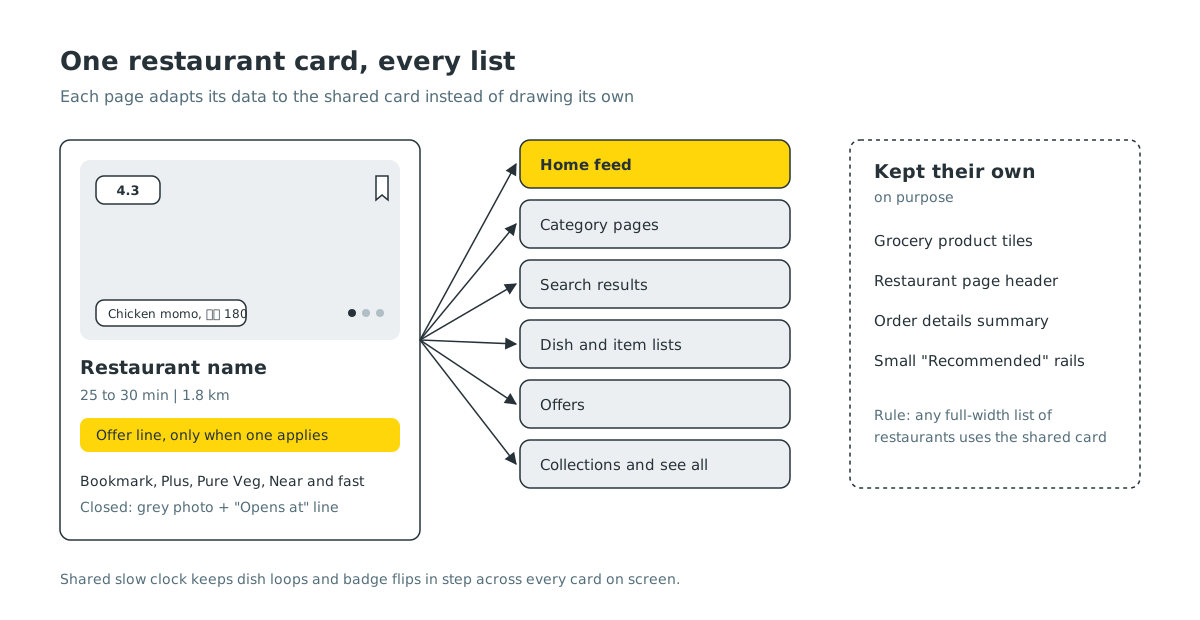
What the home card does well#
The home card earned its place because it answers the questions people actually have, in the order they have them:
- What does the food look like? A large photo, and for many restaurants a slow loop through their popular dishes, each with a small label showing the dish and its price.
- Is it good? A rating chip in the corner.
- How long, how far? Delivery time and distance on one line, separated by a thin divider.
- Is there a reason to pick it today? An offer line or a free delivery ribbon, only when one actually applies.
- Can I order right now? If not, a clear line under the name: “Closed now”, with the time it opens, and a greyed photo.
It also carries the small things: a bookmark, a Laayo Plus badge where it applies, a Pure Veg mark for vegetarian kitchens, and a quiet “Near and fast” flip for restaurants that are both close and quick. Every one of those is a fact about the restaurant, not decoration.
One component, many pages#
Technically, the change was to lift the card out of the home screen and turn it into a shared component, on both iPhone and Android. Each page now only has to say two things to it: here is a restaurant in whatever shape my data comes in, and here is what should happen when someone taps or bookmarks it.
That first part, translating each page’s data into the card’s shape, turned out to be the real work. Search results, offers and collections all come from different endpoints, and some had fields the home card expects, like distance or a vegetarian flag, while others did not. Where a page was missing something, we added it to the data rather than letting the card guess. Where a page has nothing to show, like dish prices on the offers list, the card simply leaves that part out.
Some behaviour had to be shared carefully:
- Animations in step. Cards that loop through dish photos or flip their badge all read from one shared slow clock, so every card on screen moves together instead of each one flickering on its own rhythm. Off screen, they stop.
- Bookmarks that do not fight. Tapping the bookmark updates the card immediately, and the page confirms it when its own data refreshes. If the page already manages bookmarks itself, the card waits for it, so you never see the heart turn on, off and on again.
- Opening feels the same everywhere. Tapping any card starts loading the restaurant before the page appears, and the photo and name carry over into the restaurant page. That used to be a home-only nicety.
- Accessible everywhere. The spoken labels and actions we built for the home card now come along for free on every list.
Saying “closed” one way#
The most useful side effect was consistency in bad news. Before, one page said “Closed”, another “Currently not delivering”, a third showed the card dimmed with no explanation. Now a closed restaurant looks the same wherever you meet it: grey photo, a clear line under the name, and when we know it, the time it opens next.
That matters because “closed” is the moment a customer is most likely to give up. If we are going to disappoint them, we can at least be clear about it and tell them when to come back.
Where we kept a different card#
We did not force the home card into every corner. A few places keep their own layout on purpose:
- Grocery uses compact product tiles, because you are choosing items, not kitchens.
- The restaurant page itself has its own header, since you are already inside the restaurant.
- Order details show a small store summary, because the question there is “what did I order”, not “where should I order”.
- Small rails like “Recommended for you” use a compact version so several fit across the screen.
The rule is simple: any full-width list of restaurants uses the shared card. Anything else needs a good reason.
The same thinking in Your Orders#
We applied the same idea to order history earlier this year. Each past order shows the restaurant and area, the items you had with veg or non-veg marks, the status and total, and a single main action: Reorder if the restaurant is delivering now, or a plain “Currently not delivering” if it is not. You can rate right from the card, and orders still on their way sit at the top of the same list with a Track order button, instead of hiding in a separate tab.
What it cost, and what it saved#
Replacing all those cards with one was not free. Every page had to be tested again, and a few small features that only one card had, like a swipeable photo strip in search, were dropped because the home card does not have them. We think that trade is right: one excellent card is better than eight decent ones.
It also makes the future cheaper. When we improve the card, every list improves at once. When we fix a bug in it, it is fixed everywhere. The shared card is rolling out across the app with the next update.


