
Motion that feels native, and stays cheap
How we build transitions that follow your finger, festival skins that do not drain the battery, and floating buttons that let the photo behind them shine through.

Good motion is mostly invisible. You notice it only when it is missing: a screen that slides in from the wrong side, a back gesture that does not follow your thumb, a page that stutters while something decorative spins in the corner.
Moving the customer app to native Swift and Kotlin gave us direct access to the system’s own physics. This post covers three things we learned while using it: how we keep transitions consistent, how we keep always-on animation from eating the frame budget, and how we chose the look of our floating buttons.
One motion library, not forty screens of opinions#
When every screen animates itself, you get forty slightly different slide curves. Some pages ease in, some spring, one bounces. Individually each looks fine. Together the app feels stitched together.
So we wrote one shared motion module per platform and every native screen uses it. It covers:
- Springs. A small set of named spring settings for pushes, sheets and small reveals. A new screen picks a name, not a number.
- Swipe back. On iPhone you can swipe back from anywhere on the screen, not only the very edge, and the previous page follows your finger. On Android we support predictive back, so you can peek at where you are going before you let go.
- Sheets. Bottom sheets open with a spring and can be dragged down to dismiss, with the background dimming in step with your finger.
- Shared elements. When you tap a restaurant card, the photo and name carry over into the restaurant page instead of the page appearing from nowhere.
- Cross-fades from skeleton to content. When real content replaces a placeholder, it fades in place rather than popping.
- Press feedback. A row dims slightly when touched and a button fades a little. Nothing shrinks or bounces.
Every one of these respects the phone’s accessibility settings. If you have Reduce Motion turned on in iOS, or animations switched off in Android’s settings, transitions become simple fades or happen instantly.
The first frame matters most#
The moment that makes an app feel fast is the first frame after a tap. If that frame is empty, the user waits, no matter how quickly the rest arrives.
Our rule for opening a restaurant is that the page should already look like the restaurant on frame one. The card you tapped already holds the name, photo, rating and delivery time, so the new page draws its header from that data immediately. Only the dish list, which really does need the server, shows a placeholder. The new treatment for this, where the card lifts slightly as you press and the page pushes in while home slides back, is rolling out with the next app update.
Always-on animation is expensive#
Some motion is not tied to a tap at all. During festivals, the home screen gets a seasonal skin with gently moving decorations. These are lovely, and they are also the easiest way to make a phone run hot.
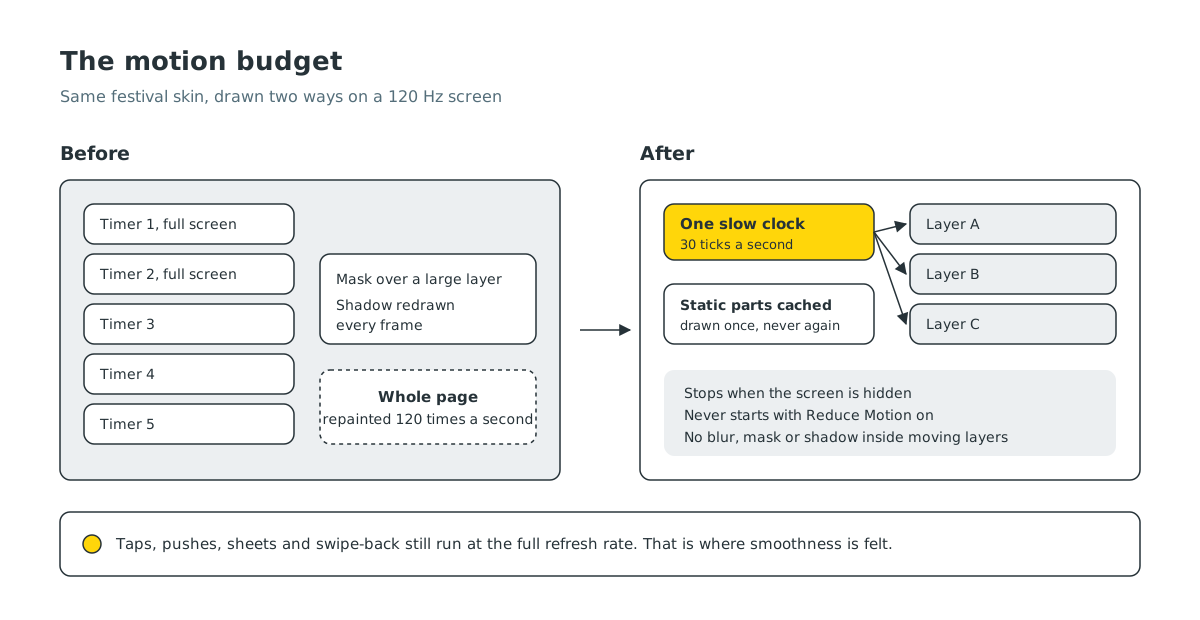
We learned this the direct way. During one festival skin, an iPhone with a 120 Hz screen felt laggy on the home page while an Android phone next to it was fine. The cause was a pile of small decisions:
- Five separate animation timers, two of them covering the whole screen, each asking for a new frame on every screen refresh.
- A masking effect that forced a full redraw of a large layer.
- A shadow being drawn again on every frame for a badge that never moved.
On a 120 Hz iPhone, that meant the whole page was being repainted 120 times a second, for decorations.
The fix was not to remove the skin. It was to draw it more cheaply:
- One slow clock. Every decorative layer now reads its progress from a single shared timer that ticks 30 times a second. All the layers land on the same frame, and the system has a quarter of the work to do.
- Static parts drawn once. Anything that does not move, like a badge with its shadow, is drawn into its own cached layer that is never repainted.
- No expensive effects inside anything that moves. Fades are done with the colour of the stroke instead of a mask, and blur or shadow effects are kept out of animated layers.
- Off when not visible. The clock stops when the screen is not on top, and it never starts when the user has asked for reduced motion.
Short, one-off moments that you trigger, like a page push or a sheet opening, still run at the full refresh rate. That is where smoothness is felt. Decorations that just drift can run slower without anyone noticing, and the battery notices the difference.
We also log dropped frames during development, so a new animation that is too heavy shows up as a number before it shows up as a complaint.
Glass that shows the photo#
Restaurant and store pages open with a large photo or video at the top, with a few floating buttons over it: back, search, share, more. For a while, those buttons were small dark frosted circles. They worked, but they read as grey blobs sitting on top of the food.
On recent iPhones we now use clear glass for every floating button. The image behind shows through, with a thin bright rim to keep the button visible, and no dark fill. On older iOS versions the same buttons fall back to a very light frosted material. Bars, search fields, sheets and toasts keep a slightly stronger glass, because they hold text that needs to be read.
Android does not have the same live blur behind views, so there we use a frosted fill tuned to look as close as we can. The goal on both platforms is the same: the button should feel like part of the photo, not a sticker on it.
What we keep asking#
Before any new motion ships, we ask three questions:
- Does it follow the user? A transition that responds to a finger beats one that plays on its own.
- Does it say something? Motion should show where something came from or where it went. Decoration that says nothing should be cheap or absent.
- What does it cost? We check it on the most demanding screen we have, not just the newest phone in the office.
Most of what is described here is in the native customer app already, and the rest is rolling out with the next update. If an animation in Laayo ever feels slow, rushed or out of place, we would genuinely like to hear about it.


