
Support calls that reach a human, faster
We run our own phone line for customers, riders and partners. When we timed it, too many callers hung up before any phone rang. Here is how we cut the dead air.

Most of our support happens in chat. But when food is late, a rider cannot find a house, or a restaurant has a problem with an order that is already cooking, people want to talk to someone. In the towns we serve, a phone call is still the most natural way to ask for help.
So Laayo has one public support number for everyone: customers, riders and restaurant partners. Behind it is our own phone system, connected to our backend. This post is about what happens when you call it, what we learned when we measured it, and how we made it reach a human sooner.
What happens when you call#
A support call moves through a few stages:
- A short greeting in Nepali. It tells you that you have reached Laayo and that calls are recorded to improve service.
- A simple menu where needed. Restaurant partners can press a key to reach the team that handles partner issues. Keypad tones are passed through reliably again, so menus are back on the table.
- Ringing the team. The call rings our support staff first inside our Admin App, where they can answer over the internet with one tap, and then on their regular phones.
- Joining. When a team member picks up, they hear a short cue so they know it is a Laayo call, and you hear a message telling you someone has joined.
Our backend knows about every call. It knows who called, whether they are a known customer or partner, which orders they have open, who answered and for how long. Recordings are stored so a manager can listen back when something went wrong, and they are converted into a compact format that plays instantly on phones.
Timing the dead air#
The system worked, but it felt slow. So we pulled the timing of every recent call out of our logs and lined up what the caller heard against what our team’s phones were doing.
The results were humbling. The typical caller waited close to a minute before talking to anyone. More than a third of callers hung up before a single phone on our side had even started ringing.
The waits were all individually reasonable:
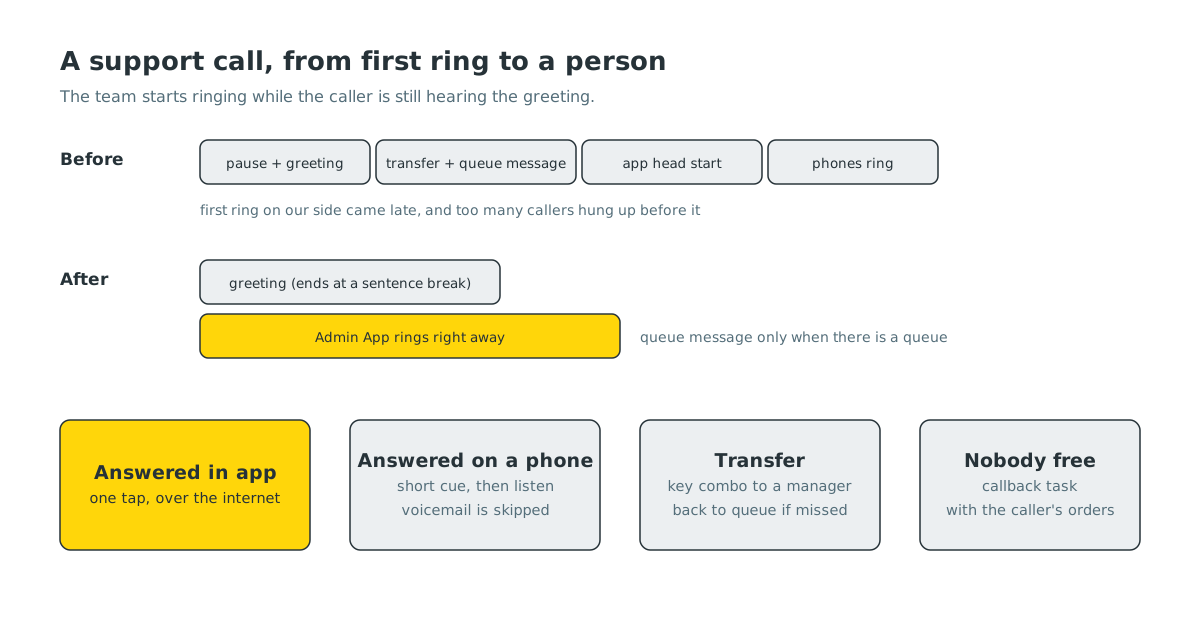
- A short pause before the greeting, then the greeting and the recording notice, about eight seconds together.
- A transfer message, a short logo sound and a queue position announcement, around ten more seconds, even when there was nobody else in the queue.
- Then the Admin App was given a head start of fifteen seconds to be answered before regular phones started ringing.
Put together, the first phone on our side started ringing about half a minute after the caller dialled. From the caller’s point of view, that is a long time to listen to recordings when your food is late.
Ringing while we talk#
The biggest change was to stop waiting for the greeting to finish before we start looking for a person. The support team’s apps now start ringing as soon as the call arrives, while the caller is still hearing the greeting. If someone answers early, the greeting finishes its current sentence and the caller is connected straight away, instead of sitting through the rest of the recordings.
That last detail mattered. Our first version connected the call the instant a team member tapped answer, which cut the greeting off in the middle of a word. It was faster, but it sounded broken. Now the system waits for a natural break: the end of the current prompt.
We also removed announcements that carried no information. A queue position message is useful when you are third in line. When you are first and only, it is ten seconds of nothing. Those prompts now play only when there is a real queue.
When the app says yes but nothing happens#
Answering in the app exposed a different kind of problem. A team member would tap answer, the screen would say “connecting”, and then “could not connect”.
We traced one of these to our own backend. When an app answers, the phone system asks our server to confirm who picked up, and it waits only a few seconds for the reply. During busy periods, the server was busy with rider location updates and app polling, and the confirmation arrived too late. The phone system gave up and dropped the app’s leg of the call. We gave call handling more headroom on the server so these confirmations are answered quickly even at peak.
Another case was on the phone itself: the app opened its connection to the phone system and then stalled while setting up audio, long enough for the connection to time out. Those fixes live in the Admin App and are rolling out with its next build.
Not counting voicemail as an answer#
When a call rings a team member’s regular phone, it can be “answered” by their voicemail. Early on, the system treated that as a successful answer and connected the caller to a voicemail greeting.
Now, when a phone picks up, the system plays a short cue and listens for a moment. A human saying hello is connected. A long recorded greeting is treated as voicemail, that phone is skipped, and the next person is tried. We also learned to never leave a team member in silence while the system listens: an answering person who hears nothing says hello a few times and hangs up, which is exactly what we were trying to avoid.
If nobody can take the call, it is not lost. A missed call becomes a callback task for the team, attached to the caller and their orders.
Passing a call along#
Sometimes the first person who answers is not the right one. A team member can press a short key combination during the call to transfer it to a manager. The caller hears that they are being transferred, and the manager hears who is calling before they are connected. If the manager does not pick up, the call goes back into the normal flow instead of ending.
What’s next#
We are tracking time to a human for every call, and the next step is to make it visible to the whole team on the operations dashboard. We also want the person who answers to see the caller’s open order on screen before they say hello, so the first sentence of every call can be “I can see your order” instead of “Can I have your phone number?”


