
Rider GPS that never gets stuck
A rider's dot on the map is a promise to the customer, the restaurant and our dispatch team. Here is how we found the ways it silently froze, and what we built so it heals itself.

When you track an order on Laayo, the little helmet moving across the map is the most watched thing in the whole product. Customers stare at it. Restaurant partners use it to time the last minute of cooking. Our dispatch team uses it to decide who gets the next order. If the dot freezes, every one of those people makes a worse decision, and none of them can tell that the dot is lying.
This post is about the ways a rider’s location could stop updating without anyone noticing, and the three layers we built to stop that from happening: a sender in the rider app that cannot wedge, a server that knows when a rider has gone quiet, and automation that uses GPS to move the order forward even when a rider forgets to swipe.
How a location point travels#
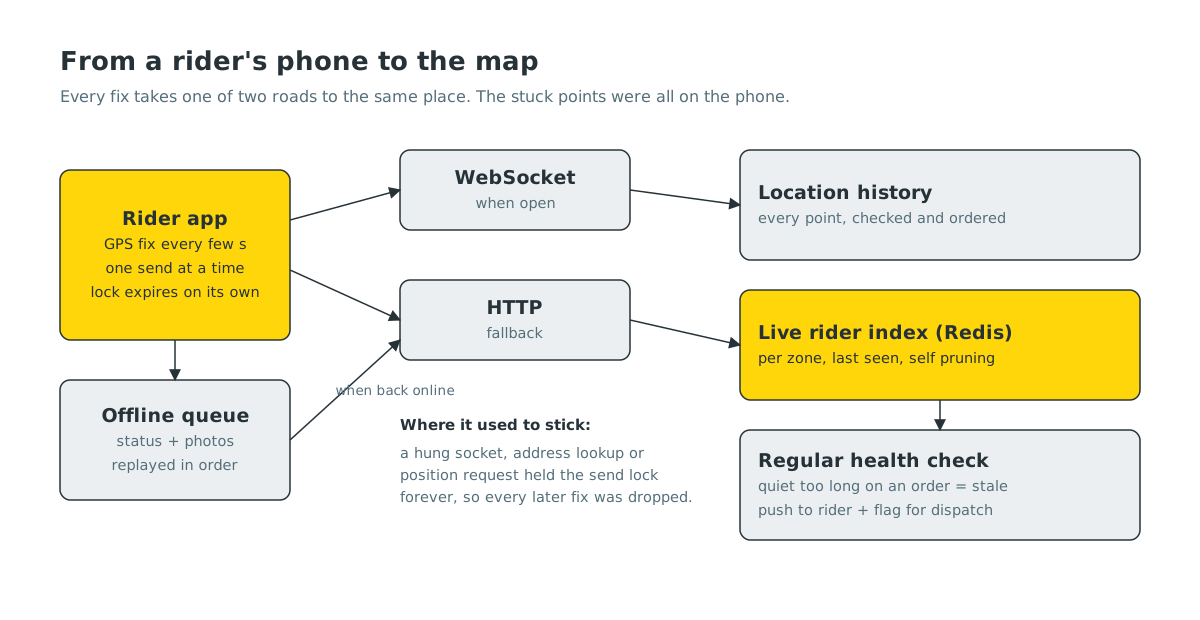
A rider’s phone produces a GPS fix every few seconds. The rider app sends it over a WebSocket when one is open, and over plain HTTP when it is not. On the server, both paths land in the same place: the point is checked, written to the rider’s location history, and pushed into a live index of riders per zone that lives in Redis. That index is what dispatch and the tracking screen read from. It is built to heal itself: every entry carries a “last seen” time, and stale riders drop out on the next read, with no cleanup job to forget about.
That pipeline was healthy. When we looked at riders whose dots had frozen, the server was receiving points perfectly well from everyone else. The problem was on the phone.
The lock that never let go#
The rider app sends one location update at a time. That is sensible: you do not want ten overlapping uploads when the network is slow. It used a simple flag for this. Set the flag, send, clear the flag.
The catch is what happens between “set” and “clear”. A send can involve opening a WebSocket, closing a half dead one, asking the phone for its current position, or turning coordinates into an address. Any of those can hang forever on a bad network or a confused phone. When one hung, the flag stayed set, and every GPS fix and heartbeat after it was quietly dropped until the rider restarted the app.
From the outside it looked exactly like a rider who had gone offline. They were still accepting orders, still delivering, still chatting with customers. Their dot just did not move.
The fix is small and boring, which is how we like fixes to be:
- The flag became a timestamp. A lock older than 45 seconds is treated as abandoned and the next send goes ahead.
- Every step that can hang got a time limit: connecting a socket, closing one, looking up an address and asking for the current position.
The permission that started nothing#
The second cause hit more riders at once. Background tracking used to start only if the phone had granted location access “all the time”. Phones, especially iPhones, regularly nudge people to downgrade that to “while using the app”. A rider who had done that, then relaunched the app while already online, never started tracking at all.
Now any granted location permission starts tracking. We still ask for “all the time”, because it keeps the dot alive with the screen off, but we no longer refuse to work without it.
Both of these fixes are in the rider app and are rolling out with the next rider app update.
A server that notices silence#
Fixing the known causes is not enough. Phones will find new ways to stop sending, so the server now watches for silence on its own.
Every minute, a health check looks at each rider’s last location point. A rider with an active order who has been quiet for two minutes, or an online rider without orders who has been quiet for five, is marked as stale. Two things happen:
- The rider gets a push that says their location is not syncing, with a cap on how often it repeats so it never turns into noise.
- Our dispatch team sees the rider flagged in the admin tools, so they stop trusting that dot for the next assignment.
In the next rider app update, that push opens a fix sheet. It is a short checklist that looks at the things we have seen go wrong in practice: GPS switched off, the wrong location permission, battery saving that kills background work, no internet, and finally whether the server is actually receiving points. Each row tells the rider what to choose and has a button that takes them straight to the right settings screen. The last check uses the server’s answer, not the phone’s opinion, because the phone is the one that was wrong.
Letting GPS move the order forward#
Once we trusted the location stream, we could ask more of it. Riders are busy. They forget to swipe “Arrived” at the restaurant, and they forget to slide “Picked up” when they leave. Every missed swipe makes the tracking screen less true and the delivery time estimate worse.
So the server now does it from GPS, carefully:
- Arrived at the store when the rider has stayed within about 70 metres of it for a short dwell.
- Picked up when the order is ready for handover, the rider was seen at the store, and then two readings a few seconds apart show them clearly moving away.
- Arrived at your door when the rider has stayed within about 100 metres of the drop point.
The rules are deliberately suspicious. A fix with poor accuracy cannot prove an arrival. Points from mock location apps are ignored. Riding past at speed does not count as arriving. Points that arrive out of order or twice are dropped, so a delayed upload can never move an order backwards. Every write is conditional, so if the rider swipes first, the swipe wins.
Automatic steps are labelled as GPS steps in the order timeline, so support can always tell what a person did from what the system inferred. Riders get a short notice when a step was marked for them, and an automatic pickup can be undone for five minutes in case the rule guessed wrong. All of this has switches in the admin settings, so we can turn any part off in seconds without a release.
When there is no signal at all#
The last piece is for the places in Birtamod and Damak where there is simply no network: basements, lifts and a few stubborn streets. Before, if a rider marked an order delivered in a dead spot, that tap was lost.
The rider app now has an offline queue. Writes such as status changes and delivery photos are saved on the phone and replayed in order when the connection comes back. A few rules keep it honest:
- Strict order. If the item at the front fails for a temporary reason, nothing behind it jumps ahead. Replaying “picked up” before the pickup photo would lose the photo, because the server refuses photos once an order has moved on.
- Photos are copied somewhere safe. The phone’s own image cache gets cleaned out, often exactly while the rider is offline.
- Login tokens are never stored in the queue. They are added at send time, so a rider who signs in again does not end up with a queue that can never succeed.
- Permanent refusals are retired, not retried. If the server says no for a reason that will not change, the item is set aside instead of blocking everything behind it.
We checked the server side before building any of this: sending the same “delivered” update several times gives the same result as sending it once, so a replay can never pay a rider twice or collect cash twice.
What’s next#
The location stream is now good enough that we want to lean on it harder. Next we want to use the live rider index to offer new orders to the nearest suitable riders first, instead of everyone in the zone at once, once it proves itself in shadow mode. We are also feeding the cleaner arrival and pickup times back into our delivery time estimates.


