
Designing for everyone who orders, and everyone who delivers
An optional accessibility profile, a short note for the rider at your door, and the small rules in our apps that respect how you have set up your phone.

The last few metres of a delivery are the most personal part of the whole order. A rider arrives, calls, knocks, waits at the gate. For most people that moment takes ten seconds. For someone who cannot hear the phone ring, cannot see which rider is theirs, or cannot easily come downstairs, it can be the hardest part of ordering food at all.
We wanted Laayo to handle that moment better, without making anyone fill in a form they do not need and without turning a private detail into a label. This post explains what we built and the rules we follow across the apps.
An optional profile, asked once#
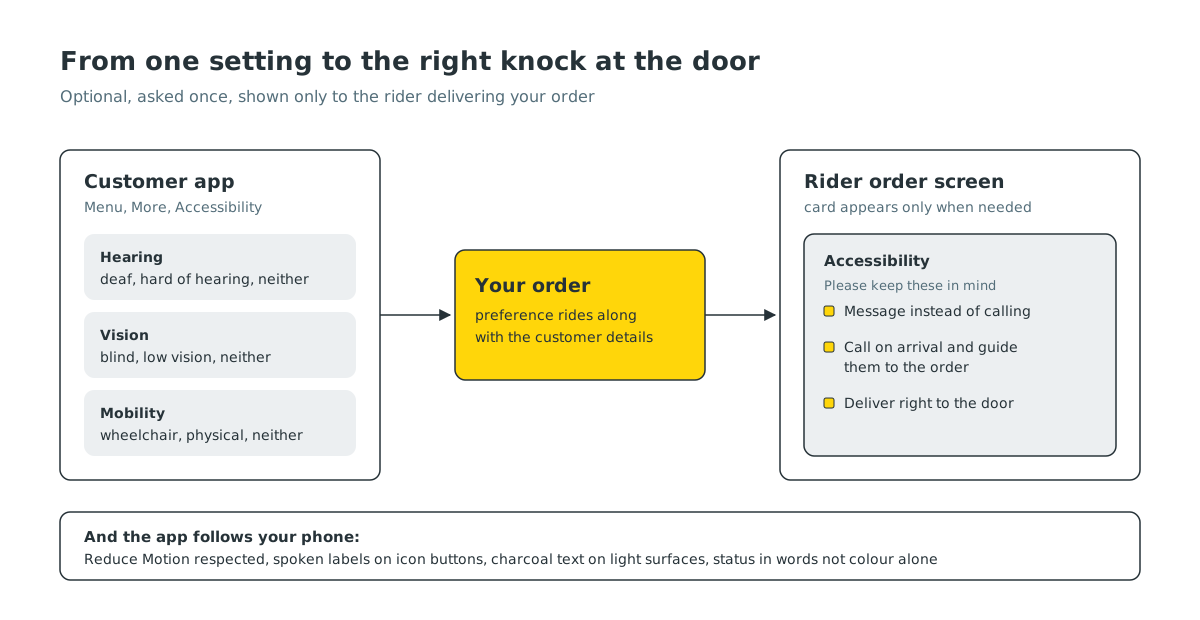
In the Laayo app, under Menu and then More, there is an accessibility section with three simple questions:
- Hearing. Deaf, hard of hearing, or neither.
- Vision. Blind, low vision, or neither.
- Mobility. Wheelchair user, other physical disability, or neither.
Every question is optional. We never show it as a pop-up, never ask during checkout and never make it a step in sign-up. If you skip it, nothing changes. If you answer “neither”, nothing changes either. We store “not answered” separately from “neither”, so we never assume something about anyone who has not told us.
You can change or clear your answers at any time from the same place.
What the rider sees#
A preference is only useful if it reaches the person at your door. When a customer has shared an accessibility need, the rider’s order screen shows a short card under the customer details. It is written as guidance, not as a diagnosis:
- For a customer who is deaf or hard of hearing, the card asks the rider to send a message instead of calling.
- For a customer who is blind or has low vision, it asks the rider to call on arrival and help guide them to the order.
- For a customer who uses a wheelchair or has limited mobility, it asks the rider to deliver right to the door.
The card only appears when there is something to act on. Riders do not see an empty box for every other customer, which keeps the card noticeable when it does appear. We are making sure every rider app in the field shows it as rider app updates roll out.
Why we keep it small#
We made a few deliberate choices to keep this respectful:
- Three questions, plain words. A longer list starts to feel like a medical form. Three questions cover the things a rider can actually do something about.
- No public badge. Nothing about your answers appears on your profile, your reviews or anything other customers can see.
- Only where it is needed. The rider sees it with the order they are delivering. Restaurant partners do not see it, because it does not change how they cook.
- It travels with the order. We attach the preference to the order details the rider already loads, so there is no extra step and no extra screen for them to open.
The app should follow your phone#
Accessibility is not only a settings page. It is also the many small ways an app either respects or ignores how you have set up your phone. A few rules we hold ourselves to in the new native apps:
Reduce Motion means reduce motion. If you have turned on Reduce Motion on iPhone, or switched off animations in Android’s developer or accessibility settings, our transitions become simple fades or happen instantly. Decorative animations, like seasonal skins on the home screen, do not start at all.
Everything tappable has a name. Buttons that only show an icon, like back, search, share or the heart on a restaurant, carry a spoken label for VoiceOver and TalkBack. We add these labels as each native screen is built, rather than in a clean-up pass at the end.
Readable type and colour. We chose Lexend as our typeface partly because it was designed for reading ease. We never put yellow text on a white background, because it fails contrast checks and is hard to read in sunlight. Text sits in charcoal, and yellow is used for fills behind charcoal text.
Status is never colour alone. “Closed”, “Delayed” or “Out of delivery area” are always written in words. Colour is a hint, not the message.
Calm feedback. At most one gentle haptic per deliberate action, and never a vibration tied to an animation or a timer. For people who rely on touch, constant buzzing is noise, not information.
Riders and partners use our apps too#
It is easy to think of accessibility only as a customer feature. Our riders read their phones on a moving scooter in bright sun, often with gloves. Our restaurant partners glance at a tablet across a hot kitchen. The same rules apply: large tap targets for the actions that matter most, clear words instead of colour, and alerts that are noticeable without being frantic.
What we want to learn next#
We do not think we have this finished. A few things we want to understand better:
- Which parts of ordering are still hard with a screen reader, from search to payment.
- Whether customers would like to add a short delivery note of their own alongside their preference.
- How riders actually use the card at the door, and what wording helps most.
If you use Laayo with a screen reader, larger text or any other assistive setting, and something gets in your way, please tell us through support in the app. Those reports go straight to the team that builds the screens, and they are some of the most useful feedback we get.


