
Momo from one place, sekuwa from another, one checkout
Families rarely agree on one restaurant. We are rolling out a cart that holds dishes from a few restaurants at once, with one rider, one bill and a delivery fee that follows the real route.

Picture a Friday evening in Birtamod. One person wants momo from the place near the chowk. Someone else wants sekuwa from across town. The youngest wants a milkshake that only one café makes properly. Until now, Laayo made you choose. Add an item from a second restaurant and the app asked whether you wanted to clear your cart. Most people either gave up on someone’s favourite or placed separate orders and paid separate delivery fees.
It is an ordinary situation, and we wanted Laayo to handle it the way a family actually orders. So we built a cart that holds dishes from a few restaurants at once. It is rolling out with the new customer app.
What you see#
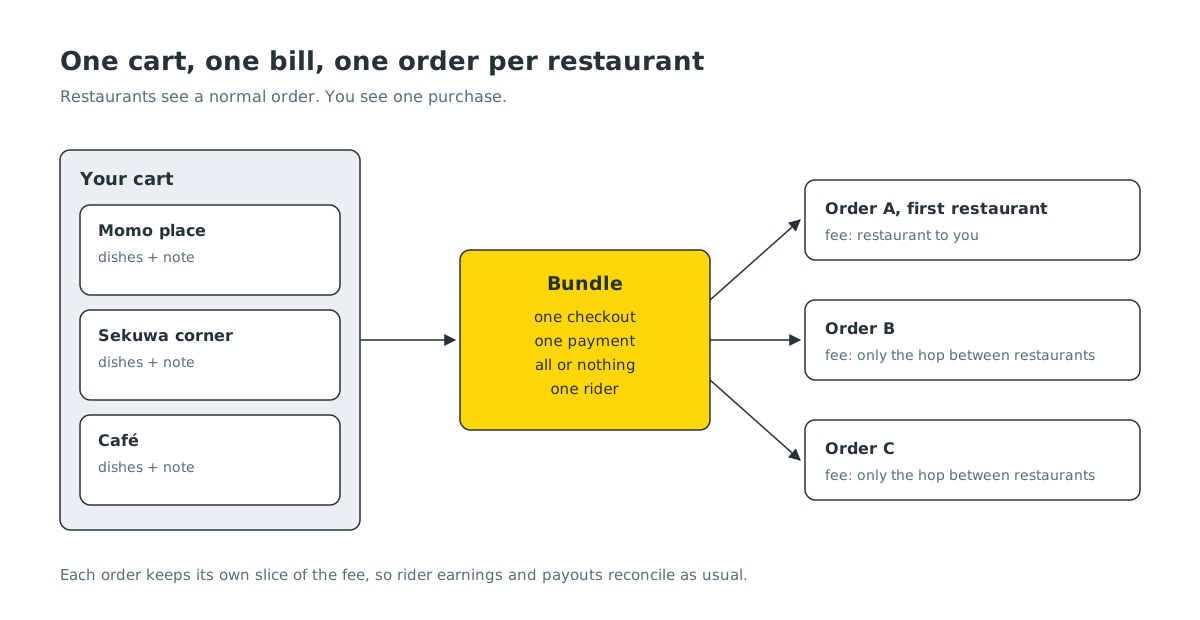
When you add a dish from a second restaurant, the app simply adds it. The cart groups your dishes by restaurant, each with its own section, its own subtotal and its own “Add a note for the restaurant”. You check out once and pay once. On the tracking screen you follow one rider who picks up from each place and then comes to you.
There is a limit to how many restaurants one cart can hold, and they all need to deliver to the same area. If you go past that, the app explains why and offers to start fresh, instead of silently dropping anything.
One bill, many orders underneath#
The obvious way to build this would have been a new kind of “big order” with several restaurants inside. We chose not to. Every other part of Laayo, from the partner app that rings in the kitchen to the rider’s earnings and the restaurant’s payout statement, is built around one order belonging to one restaurant. Changing that would have meant touching almost everything.
Instead, your cart becomes one order per restaurant, and the server ties those orders together as a bundle. For the restaurant nothing changes: they get a normal order with only their dishes and only your note to them. For you, the app shows the bundle as one purchase with one combined bill.
Placing a bundle is all or nothing. If one restaurant has run out of a dish or closed while you were deciding, none of the orders are placed, and the cart tells you what needs to change. We never want you to pay for half a dinner.
A delivery fee that follows the road#
Charging a full delivery fee for every restaurant would make the feature pointless. Charging one flat fee would be unfair to riders who really do ride further. So the fee follows the route the rider will actually take.
The first restaurant is charged like a normal delivery, from that restaurant to you. Each extra restaurant adds only the short hop between restaurants. You pay the total as one delivery fee. Behind the scenes each order keeps its own slice of that fee, so the rider’s earnings and the cash they collect reconcile exactly as they do for normal orders.
Bugs that taught us something#
Testing found two problems worth sharing.
The first was a note that wandered. If you wrote a note for the first restaurant and none for the second, the second restaurant received your first note. The code was filling in a missing note from whatever value the previous loop had left behind. Each restaurant now gets exactly the note you wrote for it, or nothing.
The second was a bill that stopped short. If one restaurant’s dish had quietly gone out of stock, the combined bill skipped that restaurant’s food and showed a much smaller total, and it did not update. Now any problem with any restaurant stops the quote and tells you which dish needs attention, so the number you see is always the full number.
Complete your meal#
The other half of a good cart is helping you finish the order you meant to make. Under your cart there is now a “Complete your meal with” strip, with tabs for popular dishes, drinks and sides from the same restaurant.
To fill those tabs, each dish needs a role: a main, a drink, a side, a dessert, a dip. Restaurants do not label their menus that way, so we use a language model to sort dishes into roles. It never sits in the way of your cart. When a dish has no label yet, a simple keyword guess fills in straight away, and the model’s label arrives in the background for next time.
While building this we also found that the strip had been empty for everyone for a while, because the app and the server disagreed about how to ask for suggestions. We fixed that on the server, so even older versions of the app started showing suggestions again without an update.
In the new native app, adding a dish from the strip feels lighter: the dish you picked folds out of the row with a small spring, the row never suggests what is already in your cart, and an empty tab simply disappears.
Paying for a bundle#
Cash on delivery and the Laayo Wallet work for bundles from the start. Paying a bundle with E-Payment is ready on the server and sits behind a switch, so we can turn it on once the new app is in enough hands. When it is on, one QR pays for every order in the bundle, and the cart stays in place until the payment is confirmed.
What’s next#
Riders will see a bundle as one trip with a pickup list, in the order that makes sense on the road. After that, we want the cart to suggest a second restaurant nearby when it would not add much to the route, which is a nice way to discover a new place without paying extra to try it.


