
One order, one chat
Chatting with your rider, the restaurant or Laayo Support should be about this order, right now. Here is how we cleaned up chat, added photos, videos and documents, and made "send me a QR" actually work.

Chat is where delivery gets real. “I’m at the blue gate.” “Can you add extra chutney?” “My order came without the drink.” Most of these conversations are short, but they happen at the moments that decide whether an order feels good or bad.
This year we made several changes to chat in Laayo. Each one came from a real conversation that went wrong.
A fresh chat for every order#
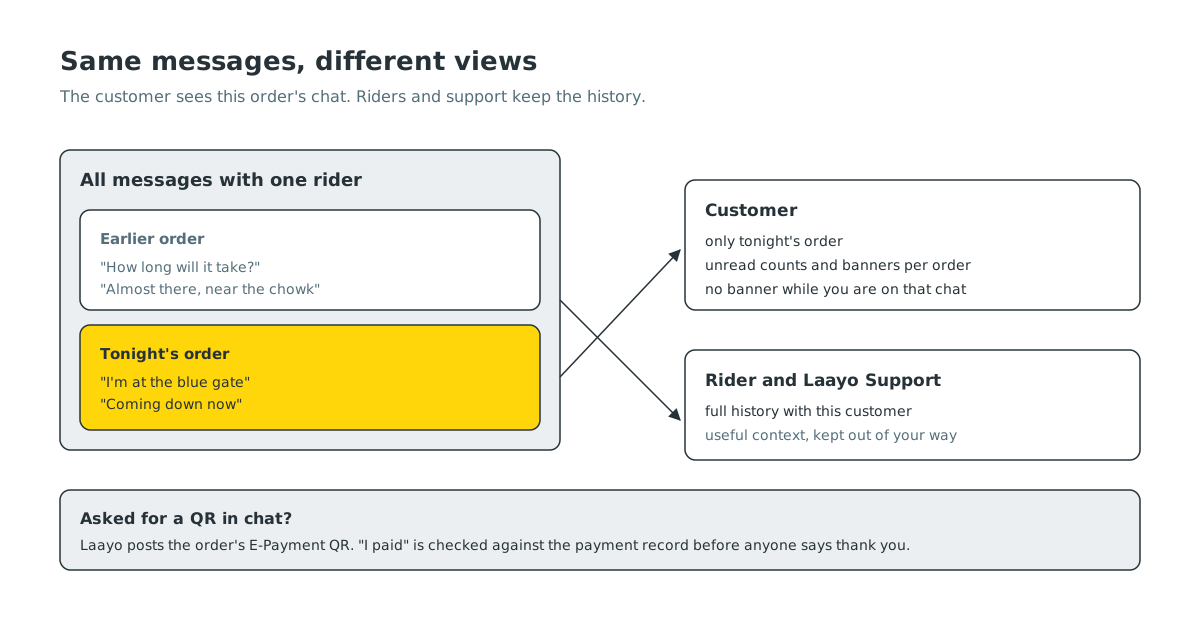
Suppose the same rider delivers to you twice in a week. Before, the app showed one long conversation with that rider across both orders. On the second evening, an old message from the first delivery, something like “how long will it take?”, would show up as unread on the new order’s tracking screen, and a “New message” banner would appear for a message that was days old. It was confusing for customers and awkward for riders.
Now, for customers, one delivery is one chat. When you open chat from an order, you see only the messages about that order. Unread counts, message previews and banners are all tied to the order too, so an old conversation can never make a new order look urgent. And while you are already looking at that order’s tracking or chat screen, we do not show a banner for a message you can already see.
Riders and our support team still see the full history with a customer, because that context helps them. “This customer always asks us to call from the gate” is useful to know. The customer just does not need yesterday’s chat on tonight’s dinner. This change is rolling out with the new app.
Show us, do not just tell us#
When something is wrong with an order, a photo explains it faster than any message. Laayo Support chat already accepted photos, but sometimes a short video of a spilled package, or a receipt saved as a PDF, explains it better.
The support chat composer now has a plus button with four choices: photos, camera, video and document. Photos open full screen with pinch to zoom, videos play inside the chat, and documents open in the phone’s own viewer. The server checks every attachment before storing anything: the type has to be one we accept, and each file has a size limit. If something does not fit, you get a clear message instead of a silent failure.
Alongside this, the Help screens now show a small badge when Support has replied and you have not read it yet. It clears as soon as you open the chat. The new attachment options arrive with the app update.
“Please send me a QR”#
Many customers decide to pay by E-Payment after the order is on its way. Some type it straight into chat, often in Nepali: “malai QR pathaidinus”, please send me a QR. Before, that message waited for a person to read it, and a rider on a bike cannot generate a payment QR.
Now the server understands that request, in the support, rider and restaurant chats alike. When a customer asks for a QR for an unpaid order, Laayo creates the order’s E-Payment QR, the same one the checkout would show, and posts it into the chat as an image with a short “Scan to pay” line and the amount. The customer can save it and scan it from their banking app.
The most important rule in this feature is about trust: ”I paid” is never taken at face value. When someone writes that they have paid, the server checks the payment record and asks the payment network for the latest status, then answers from what it finds. If the money arrived, the chat says “Paid. Thank you!” and the order is marked paid. If it has not arrived yet, the chat says so politely. A rider never has to decide whether to believe a screenshot.
There are a few deliberate limits. In the rider chat, if no online payment was ever started for the order, the assistant stays quiet, because cash and the rider’s own arrangements are the rider’s call. And the QR message contains no link, only the image, so there is nothing to tap on that could be faked by someone else.
This works on the server, so it already works in the current app. The new app adds a large “Save QR” button on the image, so you can save it to your gallery in one tap.
Messages that arrive straight away#
Chat is only pleasant when it is instant. Order status and chat messages now arrive over a live connection from our realtime service, so a reply from the rider shows up while you are looking at the screen, instead of on the next refresh. Each conversation has its own private channel, and the app falls back to checking periodically if the connection drops, so nothing is lost on a weak signal.
We also learned a small but painful lesson about long messages. On some iPhones, a very long latest message in the rider chat could break the layout of the tracking screen. The automatic messages from the QR feature now put the long explanation first and end with a short closing line, and a recent app version handles long text properly.
What’s next#
We want to bring photos and documents to the rider and restaurant chats too, with sensible limits so a rider is not asked to download a video on the road. We are also working on quick replies for common moments, such as “I’m at the gate” or “Please call when you arrive”, in both English and Nepali.


