
A home screen that changes with the day, without an app update
Festival banners, animated hero cards and section-by-section call-to-action banners are now set up by our team in the admin panel and drawn by the app. Here is how we keep them fresh, local and smooth.

The top of the Laayo home screen is the most valuable space we have. It is the first thing you see when you open the app, and it is where a Dashain feast, a new restaurant opening in your town or the Laayo Plus offer should live.
For a long time that space was a carousel of flat images. Each new banner meant someone designing an image, exporting it at the right size, uploading it, and hoping it looked sharp on every phone. Anything that moved meant an app update. Banners stayed up long after the moment had passed, because taking them down was another task on someone’s list.
Over the last few months we turned that space into something our team controls from the admin panel, and that the app draws itself.
Banners that know when and where to appear#
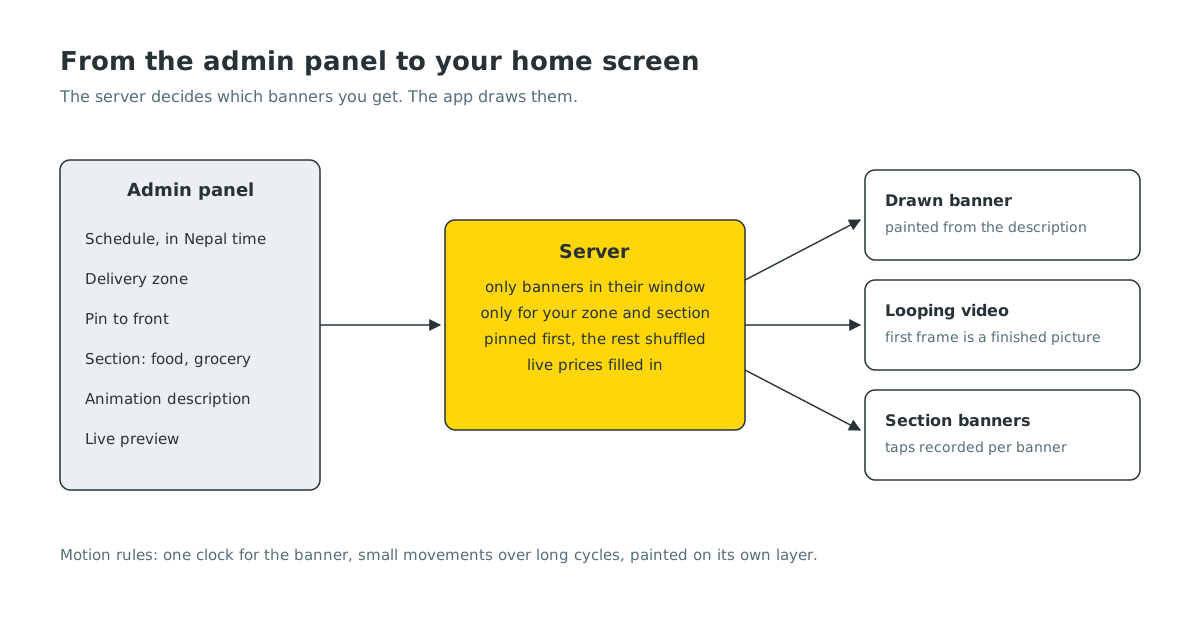
Every banner now has a schedule. Our team sets a start and an end, and the server only sends a banner to the app while it is inside its window. A festival banner can be set to appear when the festival begins and leave on its own when it ends. The schedule is in Nepal time, so “starts tomorrow” means tomorrow here.
Banners are also tied to a delivery zone. A restaurant opening in Damak is announced to people in Damak, not to everyone. While building this we found that a general type of banner was being shown in every zone, so we fixed the zone filter to apply to every kind of banner.
Our team can pin a banner to the front of the carousel. Everything that is not pinned is shuffled each time the carousel loads, so restaurants with banners share the best position fairly, and the home screen looks a little different each time you open it.
Animation the app draws itself#
For the hero card, we wanted motion without heavy video and without an app release for every new idea. So we built a small animation builder in the admin panel.
Instead of uploading artwork, our team describes a banner: a headline, a short line underneath, a button label, colours, a few small shapes or glyphs and how they should drift. The app receives that description and paints the banner with code. Because it is drawn rather than downloaded, it is sharp on every screen size, it weighs almost nothing, and changing the words is as quick as saving a form. The admin page shows a live preview that uses the same maths as the app, so what our team sees is what you get.
Positions in the description are relative to the banner, not fixed pixels, which is what keeps one design correct on a small Android phone and a large iPhone alike. Text that should come from live data, like the minimum order for free delivery in Laayo Plus, is filled in by the server at the moment the banner is sent, so a banner can never advertise a price the app would not honour.
We kept three rules for smooth motion, and any change to the painter has to keep them:
- One clock for the whole banner. Every shape moves on the same timer with its own offset, instead of each shape running its own animation.
- Small movements over long cycles. Gentle drift reads as alive. Big fast motion reads as an ad.
- Paint in isolation. The banner is drawn on its own layer, so its movement never forces the rest of the home screen to redraw.
Video where video is better#
For festivals we wanted something richer than shapes: a full scene with movement. The carousel can already play short muted video that loops, so festival banners are made as small looping clips with a still poster image behind them.
That taught us a rule we now apply to every banner: the first frame must be a finished picture. If a phone pauses the video, for example to save battery, the customer should see a complete banner, not a blank or half-drawn frame. We also found a case on iPhone where a paused video never resumed and the banner froze. The new app restarts only the visible slide, picks the video back up when you return to the app, and keeps the poster on screen until the video is genuinely moving.
A banner in every section#
Below the carousel, smaller call-to-action banners point to things like a restaurant, a collection or a page in the app. Food, grocery and pharmacy each have their own home, so each section now has its own list of these banners in the admin panel, and a banner made for groceries cannot accidentally show on the food home.
Setting this up section by section also surfaced some bugs that were invisible from the app. Turning a banner’s button off did not save. Some pickers in the admin form did not show their options. Taps on a banner were being recorded against the wrong address, so we had no idea which banners people actually used. All of these are fixed on the server, and the native home screens will show these banners directly in the next app update.
Why this matters#
None of this is visible as a “feature”. You will just notice that the home screen fits the day: the festival when it is the festival, your town’s new restaurant when it opens, the right offer for the section you are in. For our small team it means a seasonal campaign is an afternoon of work in the admin panel instead of a design request, an image export and an app release.
What’s next#
We want restaurants to be able to request a banner from the partner app, using their own logo and colours, with our team approving it. We are also exploring banners that respond to the time of day, so the morning home screen leans towards tea and breakfast, and the evening one towards dinner.


