
Open, closed, or somewhere in between
"Is this restaurant open?" sounds like a yes or no question. In a delivery app it has at least five answers. These are the rules we use so every screen gives the same, honest one.

Ask a customer what “closed” means and they will tell you: I can’t order from there right now. Ask the system and you get a longer list. A restaurant can be outside its opening hours. It can be inside its hours but paused by the owner because the kitchen is swamped. And every restaurant in a town can be paused at once by our operations team. And a restaurant can be perfectly open but not delivering to your address at this hour.
Each of those used to be handled a little differently on different screens. The result was the worst kind of bug: not a crash, but an app that contradicts itself. A restaurant that shows up as recommended, then turns out to be closed when you tap it. A menu that vanishes entirely because the kitchen paused for twenty minutes.
This post describes the rules we settled on. The plumbing that pushes open and close changes to phones in real time is covered in part three of our tech stack series; this is about what the app should say once it knows.
Rule one: closed means “can’t order”, not “doesn’t exist”#
Early this year, a partner paused their restaurant for a short while and something strange happened: menu items disappeared everywhere. Customers opening any restaurant saw “No items available right now”, even restaurants with dozens of dishes.
The cause was a filter that hid items whenever restaurants were paused, applied far more broadly than intended. The deeper problem was the idea behind it. Hiding the menu treats “closed” as “gone”. But a customer browsing a closed restaurant is often planning dinner, checking a price, or deciding whether to schedule an order.
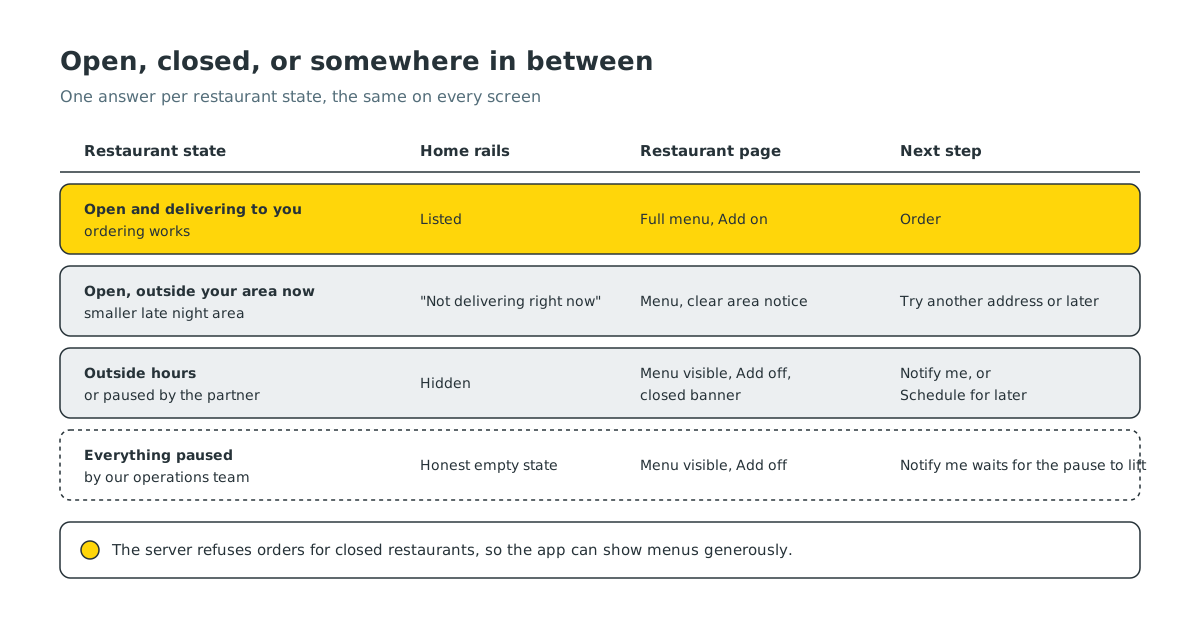
So the rule is now explicit for all three kinds of closed (outside hours, paused by the partner, or everything paused by us):
- The menu stays visible. You can scroll, read and look at photos.
- Ordering is switched off. The Add buttons are disabled and a clear banner above the menu says the restaurant is closed.
- Placing an order is blocked on the server too. The app’s disabled button is a courtesy. The real gate is the order endpoint, which refuses an order for a closed restaurant no matter what the app shows.
That last point is what makes the first two safe. Because the server enforces it, the app is free to show menus generously.
Rule two: home only shows what you can order now#
The home screen is the opposite case. It is a list of suggestions, and suggesting something you cannot order is worse than suggesting nothing.
So the home rails, such as Recommended, Popular, Top offers and Visit again, are strict: a closed restaurant or an unavailable dish never appears on them. We had an old exception that relaxed this when every restaurant seemed to be paused, meant for the rare all-paused case. In practice it leaked into ordinary evenings when a few restaurants were closed, and closed cards started appearing in Recommended. We removed it.
When every restaurant near you is genuinely closed, home does not pad the page with grey cards. It shows a short, honest empty state that kitchens are taking a break. We think that is more respectful of your time than a page full of things you cannot order.
Rule three: open is not the same as delivering to you#
Some restaurants deliver to a smaller area late at night than during the day. At 10 pm a restaurant can be open, cooking and taking orders, yet not delivering to your street.
We used to count those restaurants under “restaurants delivering to you” because they were open, while their own card said “Out of delivery area”. The list and the card disagreed. Now “delivering to you” means open and covering your address right now. Restaurants that are open but outside your area at this hour move to a separate “not delivering right now” group, listed ahead of the ones that are closed, because they are the closest to being available.
Rule four: when you want it, tell me when it opens#
A closed restaurant page used to be a dead end. Now the bottom bar, where the cart button normally sits, offers two actions:
- Schedule for later. If the restaurant accepts scheduled orders, you can pick a time slot right there. If it does not, the button stays visible but dimmed, so the option is never mysteriously missing.
- Notify me. Tap it and we send you one notification when the restaurant opens, which takes you straight back to its page.
Notify me sounds simple, but “exactly one notification” took some care. A restaurant can open in several ways: its scheduled opening time arrives, the partner taps reopen after a pause, a timed pause runs out on its own, or our team lifts a city-wide pause. We handle these through two paths:
- Instant. When a partner reopens from their app, a job runs right after their request completes and notifies everyone waiting.
- Backstop. Once a minute, a small task checks for anyone still waiting on a restaurant that is now open. This covers scheduled openings and timed pauses, which have no button press to react to. When nobody is waiting, it finishes almost instantly.
Both paths can race. To make sure nobody gets two messages, each waiting request is claimed in a single database update before its notification is sent. Whichever path claims it first sends it; the other finds nothing left to send. Nothing is sent while a city-wide pause is on, and tapping Notify me again later re-arms it.
Rule five: a fee you are not sure about is not a fee#
The last rule is about the delivery fee shown at the top of a restaurant page. Customers told us that if they opened one restaurant, went to another and came back, the fee sometimes sat on “Calculating” forever.
There were two causes. First, the app kept only one live fee quote at a time, shared across restaurant pages. Opening a second restaurant replaced the first restaurant’s quote, and nothing asked for it again when you came back. Second, when a quote failed, because of a timeout or a busy moment on the network, the app remembered that it had already asked and never tried again.
The fix:
- Remember the last good fee per restaurant, valid for the same delivery address and for a limited time. Coming back to a restaurant shows its fee immediately.
- Retry a failed quote a couple of times, a few seconds apart, and only for the page you are still looking at.
- If it still fails, show the delivery time without a fee rather than a spinner that never ends. Checkout always calculates the final fee before you pay.
These changes are rolling out with the next app update.
The common thread#
All five rules come from one principle: every screen should give the same answer, and the answer should be what the customer can actually do. Can I see it? Can I order it? Will it come to me? When will it open? How much will delivery cost?
When the answer is “not right now”, we say so plainly, show what we can, and give you a next step. That turns out to matter more than any single feature on the restaurant page.


