
How to pay on Laayo
Cash on delivery, E-Payment by QR, the Laayo wallet and gift cards. Which payment options Laayo accepts, how each one works, and what to do if a payment goes wrong.

Laayo keeps paying simple. You can pay in cash when the food arrives, or pay before delivery from the app. This guide explains every option and what to do if something does not go through.
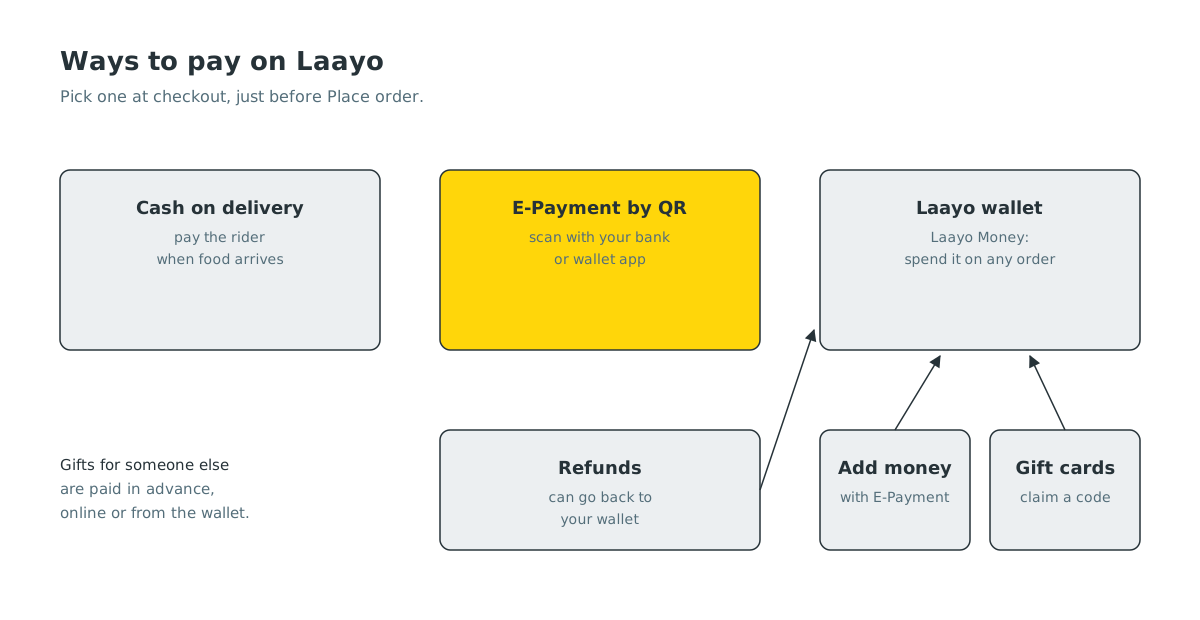
What payment methods does Laayo accept?#
- Cash on delivery. Pay the rider in cash when your order arrives.
- E-Payment by QR. Pay from your bank or wallet app by scanning a QR code that the Laayo app shows you.
- Laayo wallet. Pay from money you have added to your Laayo wallet, refunds, gift cards you have claimed and other credits.
You choose the method at checkout, just before you tap Place order. Some orders, such as gifts for someone else, need to be paid in advance, and the app tells you when that is the case.
How does E-Payment by QR work?#
When you choose E-Payment and place your order, the app shows a QR code with the exact amount. Open your mobile banking or wallet app, scan the code, and confirm the payment there. Many banking apps let you scan a QR straight from a screenshot saved to your gallery, which is handy if you are paying on the same phone.
When the payment arrives, the Laayo app marks it as paid and your order goes to the restaurant. You do not need to send anyone a screenshot or a transaction number. Read Paying with a QR inside the app for the full story.
How does the Laayo wallet work?#
The Laayo wallet, called Laayo Money in the app, holds money you can spend on orders. Money gets into your wallet in a few ways:
- Adding money with E-Payment.
- Refunds for cancelled or problem orders, when refunded to the wallet.
- Gift cards that someone sent you, once you claim them.
- Rewards and bonuses during offers and festivals.
At checkout, pick the wallet as your payment method. If your wallet does not cover the whole order, the app shows you how to pay the rest. You can see every wallet transaction in the app’s wallet screen.
Can I pay with a gift card?#
Yes. A Laayo gift card comes with a code. Claim it in the app and the value goes into your Laayo wallet, ready to spend on any order. See Gift cards and Send a Treat.
Can I tip my rider?#
Yes. You can tip your rider in cash, or from the app after delivery using E-Payment or your wallet. The whole tip goes to the rider. Read Tipping your rider.
What if my E-Payment fails?#
Do not pay a second time straight away. First:
- Check the order screen. If it shows the order as paid, you are done.
- Check your bank app. If money left your account but the order still shows unpaid, wait a little. Payments sometimes take a moment to confirm.
- Contact support. If it still does not match, open support chat from the order and tell us. Include the time you paid. We check the payment on our side and either confirm the order or refund you.
If an order is cancelled after you paid, the money is refunded. You can follow every refund step by step in the app. See Refunds you can follow.
Is paying in the app safe?#
The QR you scan is created for your order and amount only, and the payment is confirmed by the payment network, not by a screenshot. Laayo never asks for your bank PIN or password, by phone, chat or SMS. If anyone claiming to be Laayo asks for one, do not share it and report it to us.
Quick answers#
Does Laayo accept cash on delivery?#
Yes. You can pay the rider in cash when your order arrives, except for orders that must be paid in advance, such as gifts.
Can I pay with my mobile banking app?#
Yes. Choose E-Payment at checkout and scan the QR code with your mobile banking or wallet app.
What is Laayo Money?#
Laayo Money is the Laayo wallet. It holds money you add, refunds, claimed gift cards and rewards, and you can spend it on any order.
Money left my account but the order says unpaid. What should I do?#
Wait a moment, then check again. If it still says unpaid, contact support from the order with the payment time and we will sort it out.
Will Laayo ever ask for my bank PIN?#
No. Laayo never asks for your PIN or password. Do not share them with anyone.


