
Share your order, not your phone
Someone else is often waiting at the gate. Live tracking now opens on its own after you order, and one link lets anyone follow the rider without installing the app.

In our towns, the person who places the order is often not the person who opens the gate. A daughter at college orders lunch for her parents. Someone at the office orders for a colleague downstairs. A host orders snacks and then gets busy with guests. In all of these cases, the person waiting has no map to look at, so they end up asking the person who ordered, who then has to open the app and relay what it says.
So we worked on two things: making sure the person who orders actually finds the tracking screen, and letting them share it with anyone in one tap.
Tracking that opens itself#
We noticed that many customers never opened live tracking at all. After placing an order, the app showed a confirmation and then sent people back to the home screen. Tracking was there, but you had to know where to look.
Now the confirmation moves you into tracking by itself. In the current app, the small handle at the top of the “Order placed” sheet fills up as a countdown, and when it is full you are on the tracking screen. If you want to save the address first, tapping the save button pauses the countdown, and finishing the save takes you to tracking too. Every way out of that sheet leads to tracking, so nobody ends up on the home screen wondering what happens next.
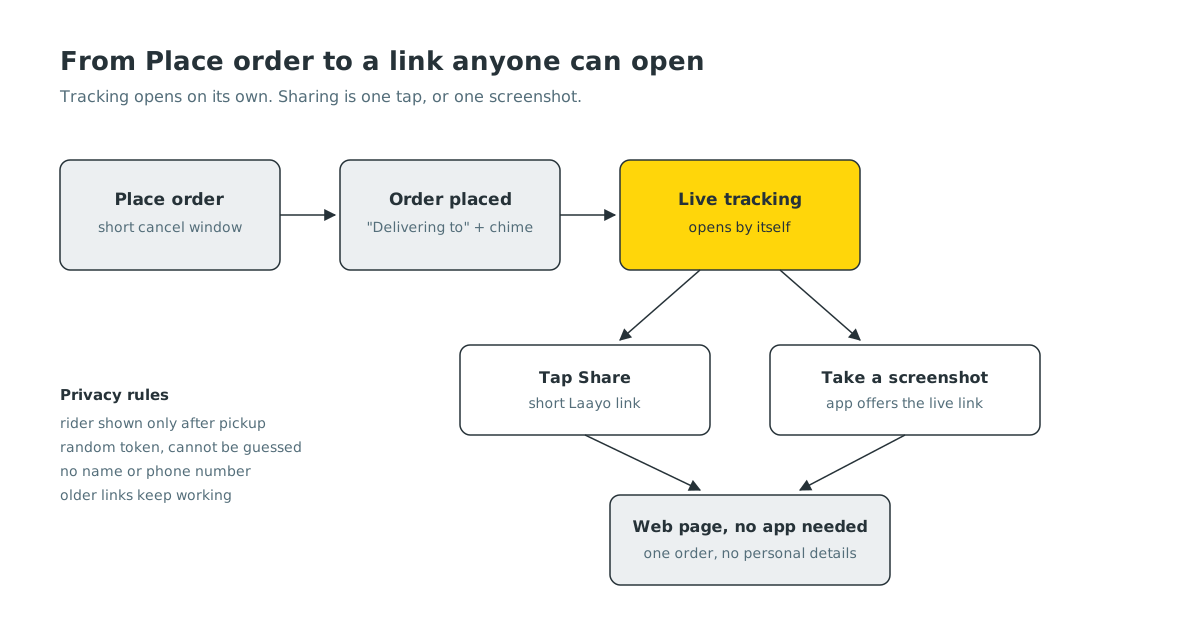
In the new native app, rolling out now, the moment is a little more personal. After you tap Place order, a short bar fills while you can still cancel. Once it is sent, a full screen confirms the order with a chime and a gentle buzz, shows a pin and “Delivering to” with your address label, and then opens live tracking. While the tracking screen loads, you see a placeholder shaped like the tracking screen itself, not a spinner, so the page does not jump when the real content arrives.
One link for everyone else#
The tracking screen now has a Share control. It creates a short Laayo link to a web page that shows your order’s live status and the rider on a map. The person you send it to does not need the app or an account. They just open the link.
A few rules keep this safe and simple:
- The link shows one order, nothing else. No name, no phone number, no order history. Each link carries a long random token, so links cannot be guessed by counting.
- The rider appears only once your food is on its way. Before pickup the page shows the order’s progress, not anyone’s location. This is the same privacy rule the app follows.
- Old links keep working. We moved to a shorter link format, but every link already sent in a chat still opens.
Sharing at the moment you think of it#
Here is a small habit we noticed: when people want to show someone where their order is, they take a screenshot. A screenshot is a frozen picture of a moving thing. By the time it arrives, it is wrong.
So when you take a screenshot of your tracking screen, the app now offers a small sheet with a copyable live link. You can still share the screenshot if you want. The link just sits there as the better option.
On iPhone this works on all supported versions. On Android it works on newer versions of Android, which can tell an app that a screenshot was taken without asking for permission to read your photos. Older versions could only do it by asking for access to your entire photo library, just to notice a screenshot. We decided that trade was not worth it, so on older Android phones you share from the Share control instead.
We were careful not to make this noisy. If you take several screenshots in a row, you see one sheet, not a stack of them, and if creating the link fails in the background, nothing pops up to bother you.
A smoother map#
Sharing a map only helps if the map is good. The live map used to stutter on busy phones, because the app redrew the rider’s scooter many times a second from the app’s own code. We moved the map drawing into the phone’s native map view, so the scooter now glides along the road smoothly while the rest of the screen stays exactly as it was. The rider marker shows the rider’s photo, and when a rider marks that it is raining in their area, a small weather note appears on your tracking screen, so a slower ride does not come as a surprise.
What’s next#
We want the shared page to say what the rider sees too, for example “Rider is at the restaurant, food is being packed”, in the same plain words as the app. We are also looking at letting the person you share with send a short note to the rider, such as “use the back gate”, without needing your phone.


